What it does
See connected business information and practical next steps in one account workspace.
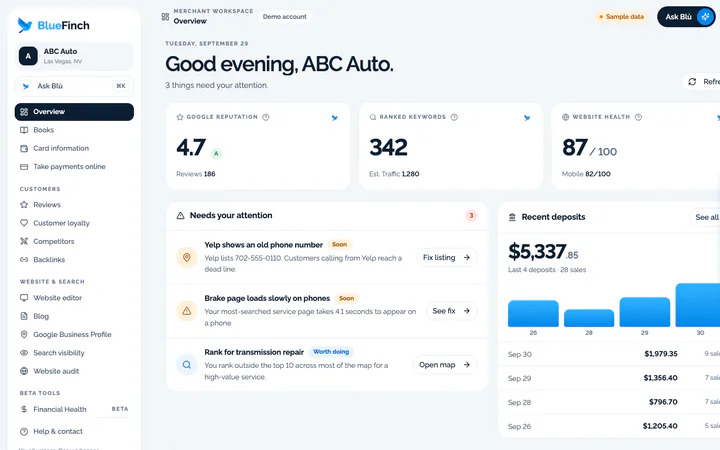
With a dozen logins, you can have plenty of numbers but no clear next step. The dashboard organizes tools around your customers, website and payments.
What the workspace includes
One menu for enabled merchant tools
Connected profile and business metrics where available
Links from an issue to the workspace that can help address it
Account-specific access and connection status
Who it fits
Owners who want a regular review of their business tools
Businesses that prefer one starting point for several connected services
When another solution may fit better
A replacement for every POS, accounting, inventory, or industry management system
Real-time figures from sources you have not connected
How you would use it
Check the date: Start with the source and freshness of a figure.
Open the issue: Move from an overview signal into reviews, visibility, website, or payment details.
Review the change: Use a later comparable observation to see what happened.
Data, connections, and automation
Shows available account and integration data. The demo uses fictional sample data. Financial Health and Reports have additional access controls and connection requirements.
Each connected source has its own update process. The dashboard does not make disconnected or delayed data real-time.
Cost and eligibility
This tool has no additional software charge when it is listed as included in your eligible BlueFinch merchant package. Have BlueFinch confirm access, connected services and usage limits in writing. Payment processing and account-specific charges are separate.
For eligible U.S. BlueFinch merchant accounts with this tool enabled. A demo does not activate service or confirm your account’s access.
Availability: Merchant account. Service area: Eligible businesses in the United States.
Google Data Studio offers self-service reports at no charge for creators and viewers, checked October 2, 2026. Its listed Pro project subscription is $9 USD per user, per project, per month. Connecting data and building useful reports still takes work; confirm any connector or data-service charges. A report builder is not the same as a preconnected merchant dashboard.
Limits to know
Missing data is not evidence that a business has no activity.
Deposits, revenue, cash flow, and profit are different measures.
Enabled tools and source coverage vary by account.
Example workflow
On Monday, an owner reviews new feedback, checks whether an important page needs attention, and opens the payment activity they need for reconciliation.
Questions before you start
Does it show profit automatically? Only a complete, appropriate accounting source can support a profit figure. Card deposits or a bank balance alone cannot.
Can I try it without an account? Yes. The public demo shows a fictional business and does not connect to your financial accounts.
How do I get this for my business? Ask your BlueFinch representative to confirm eligibility, included features, any extra charges, and setup requirements in writing. Existing customers can check their account; new customers can request a business review.