Check funding for the approved refund queue
Compare available refund funds with the approved queue, then show the effect of your chosen operating buffer.
Use the interactive tool without signing up. It runs in your browser: enter your numbers, save a comparison, download results or print a working copy. Your numbers are not sent to BlueFinch.
Illustrative example inputs
These starting values show how the math works. They are not industry averages, customer results or a quote.
| Input | Example value |
|---|---|
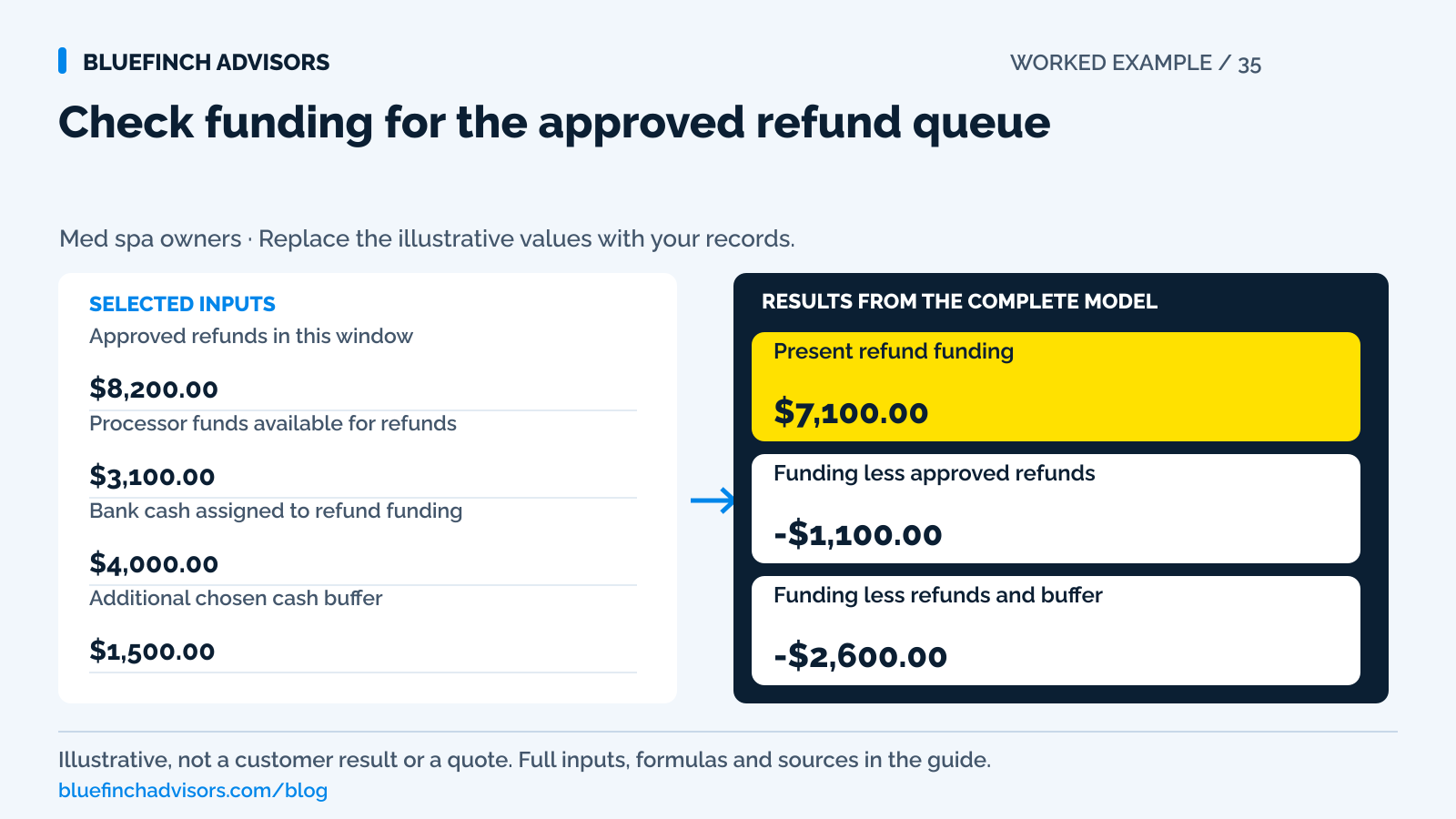
Approved refunds in this window Amounts approved and not already completed. | $8,200.00 |
Processor funds available for refunds Exclude pending, reserved, or otherwise unavailable balances. | $3,100.00 |
Bank cash assigned to refund funding Cash you can move through the provider's supported route within the window. | $4,000.00 |
Additional chosen cash buffer Your planning allowance, not a legal or industry-required reserve. | $1,500.00 |
Pending processor balance Displayed separately and excluded from present funding. | $5,000.00 |
Example results
| Measure | Result |
|---|---|
Present refund funding Only available processor funds and assigned bank cash. | $7,100.00 |
Funding less approved refunds Negative means current funds do not cover the queue. | -$1,100.00 |
Funding less refunds and buffer A signed gap, not an instruction to delay refunds. | -$2,600.00 |
Calculation detail
| Measure | Result |
|---|---|
| Approved refund queue | $8,200.00 |
| Chosen additional buffer | $1,500.00 |
| Pending funds excluded | $5,000.00 |
Model assumptions
- Illustrative one-window liquidity check; input dates must match.
- Assigned bank cash is assumed available through a supported funding route in time. Verify the route and timing before relying on it.
Read alongside these results
- Do not use this model to postpone legally or contractually required refunds.
- Processor rules, bank funding timing, disputes, and reserves can change available funds.
Download this worked example (CSV). Use the interactive version to export your own inputs and results.
Download infographic (PNG) · Download vector (SVG) · Link to the source and methodology


The short version
- Track approval, submission, pending processing and completion separately.
- Use funds available for refunds, not pending sales, in the present funding check.
- Treat the buffer as planning cash, not permission to delay a refund obligation.
Several package refunds are approved in the same week that payroll and supplier payments leave the bank. The processor dashboard shows a healthy total balance, but part of it is pending. The owner needs to know which refunds can be funded through the supported route and what additional cash is needed.
This calculator is a short-horizon funding check. It does not set refund rights, authorize a reserve hold, or recommend delaying an amount that must be returned. The sample is fictional. Resolve the approved refund amount first, then use dated cash information to make the payment happen.
Use with this guide
Package payment planner
Identify which collected amounts still support future obligations.
Effective-rate audit
Verify retained original fees and account charges.
Payment software scorecard
Test refund status and reporting before a provider change.
Med-spa refund requests: communicate verified status
Communicate med-spa refund status from verified provider evidence. Use the message register to separate the approved amount, actual outcome and customer follow-up.
Browse the complete medical spa guides and worksheets.
Build the queue from approved decisions
Start with the refund reference, original payment, amount approved, approval date, status, required timing, and responsible staff member. A customer request that is still being reviewed belongs on a separate list. Combining every inquiry with approved refunds makes the cash forecast unstable and obscures overdue work.
For each approved item, check whether it was already submitted. A pending processor refund is not a reason to submit another refund by check without investigating. A second route can create a duplicate repayment if the original later completes. Stripe warns of double-refund risk in certain bank-debit situations. The general operating lesson is to confirm status before acting again.
Keep sensitive treatment details out of this funding sheet. The payment team needs the approved amount and transaction references. Any clinical review can remain in the appropriate record system with access limited to the people handling it.
Sources for this section: Stripe: refund funding, destinations, and refund status · HHS: Privacy Rule coverage and protected payment information
Read the balance categories, not the large total
Stripe's balance report includes available, pending, and reserved funds where applicable. Its refund documentation says refunds use available balance, excluding pending amounts. If the available balance is insufficient, card refunds can remain pending under that provider's workflow. Other payment methods may behave differently.
Do not assume every processor funds refunds in the same way. Some workflows draw from a linked bank account. Some support a top-up. Some require available processing balance. Ask which route is supported for your account and how long it takes. The calculator includes bank cash only when you can actually make it usable within the chosen window.
A payout already sent to your bank has left the processor balance. Counting it both as processor funds and bank cash doubles funding. Likewise, the gross sales report may include transactions that have not yet reached an available balance. Reconcile each cash source to its location and date.
Sources for this section: Stripe: balance reporting and available versus pending funds · Stripe: refund funding, destinations, and refund status
The sample needs $1,100 for refunds, or $2,600 with its buffer
The approved queue is $8,200. Available processor funds are $3,100 and the owner has assigned $4,000 of usable bank cash. Present funding totals $7,100. Subtract the approved queue and the result is negative $1,100.
The owner also chose a $1,500 additional buffer for this planning window. Funding less refunds and that buffer is negative $2,600. The distinction matters: $1,100 is the modeled shortfall against approved refunds. Another $1,500 restores the chosen cushion. The cushion is not a reason to hold back an approved payment.
The dashboard also shows $5,000 pending. It remains visible but excluded. When those funds become available, update the available input and remove the corresponding pending amount. Do not add the same $5,000 twice, and do not assume its release date merely because prior batches settled quickly.
Put the funding date next to the required action
Use a daily view when the queue is concentrated. The owner should be able to see which refund needs funding before the next payout, which refund is already processing, and which one failed. A monthly total can look adequate while the Tuesday balance is insufficient.
Once submitted, use the processor's status and trace references to answer customer questions. Distinguish the practice's submission from the issuer's posting. Promise only the steps and dates you control. If the provider reports a failure, obtain its supported resolution path instead of repeatedly clicking the same action.
Reconcile the queue back to the payout or balance report after completion. Stripe's automatic payout reconciliation identifies the included charges, refunds, fees, and other balance movements. That is more reliable than trying to match a net bank deposit directly to gross treatment sales.
Sources for this section: Stripe: matching transactions to automatic payouts
Retained fees belong in the cash forecast
When comparing a new processor or dual-pricing proposal, ask what happens to original fees after a refund and whether additional refund charges can apply. Stripe states that its original processing fees are not returned. Another provider's terms may differ. Use the written account terms and actual statements rather than treating the refund as a perfect reversal.
Preserve the original price and tender record. If an old payment included a permitted surcharge, the acquirer should specify the related refund calculation. If the practice used posted cash and card prices, keep that distinction intact. The funding worksheet should include the approved customer refund, not a new amount reduced by a guessed fee.
Visa debit and prepaid transactions cannot be surcharged under Visa's U.S. rules, and a wallet does not establish that the underlying card is credit. A payment program that reduces eligible-credit expense can still leave debit, monthly, refund, and software costs for the merchant. Those retained expenses affect available cash.
Sources for this section: Stripe: refund funding, destinations, and refund status · Visa: U.S. merchant surcharging and displayed-price distinctions
Review concentration before it becomes a rush
Group approved refunds by original sale period, program, and reason. A cluster after a canceled provider day or a changed service offering may require a different funding plan from a normal mix of retail returns. Do not infer clinical causes from payment data. Ask the responsible team for an approved operational explanation.
Check the next two payroll and supplier dates alongside the refund queue. If the modeled funding is short, arrange an authorized funding action through the provider and bank and escalate timing concerns promptly. This guide does not choose borrowing, owner funding, or any other financing source.
For the next close, retain a concise record of forecast refunds, actual completed refunds, funding transfers, and the largest differences. The immediate next step is to verify today's available processor balance and the supported bank-funding route. A large pending balance is not that verification.
Sources for this section: Stripe: balance reporting and available versus pending funds
Questions business owners ask
Is the buffer a required refund reserve?
No. It is an owner-selected planning input. Legal, contractual, and processor reserve requirements are separate.
Why exclude pending funds that usually settle tomorrow?
Because the tool measures present funding. You can run a separate dated scenario once availability is confirmed.
Can I refund by another route when the first refund is pending?
First confirm the original status and provider-supported process. Otherwise the client can receive both payments.
Primary sources
BlueFinch last reviewed these sources on October 2, 2026. Payment rules and state requirements can change.
- Stripe: refund funding, destinations, and refund status
- HHS: Privacy Rule coverage and protected payment information
- Stripe: balance reporting and available versus pending funds
- Stripe: matching transactions to automatic payouts
- Visa: U.S. merchant surcharging and displayed-price distinctions
Use this page for general business information. It is not legal, tax, or accounting advice.