Check credit before the restart invoice
Apply approved credit additions, use and refund reductions, then compare the remaining dollar credit with the first resumed bill.
Use the interactive tool without signing up. It runs in your browser: enter your numbers, save a comparison, download results or print a working copy. Your numbers are not sent to BlueFinch.
Illustrative example inputs
These starting values show how the math works. They are not industry averages, customer results or a quote.
| Input | Example value |
|---|---|
Credit at start of pause Verified dollar credit, not the retail value of unused sessions. | $180.00 |
Approved credit added during pause Only documented credits granted under the agreement. | $90.00 |
Credit used during pause If the approved plan allows use while billing is paused. | $60.00 |
Credit removed by approved refund A matched reduction after the refund decision. | $30.00 |
First resumed invoice before credit Approved billing amount, including any supported proration. | $150.00 |
System credit before restart The balance actually shown before applying the resumed invoice. | $200.00 |
Example results
| Measure | Result |
|---|---|
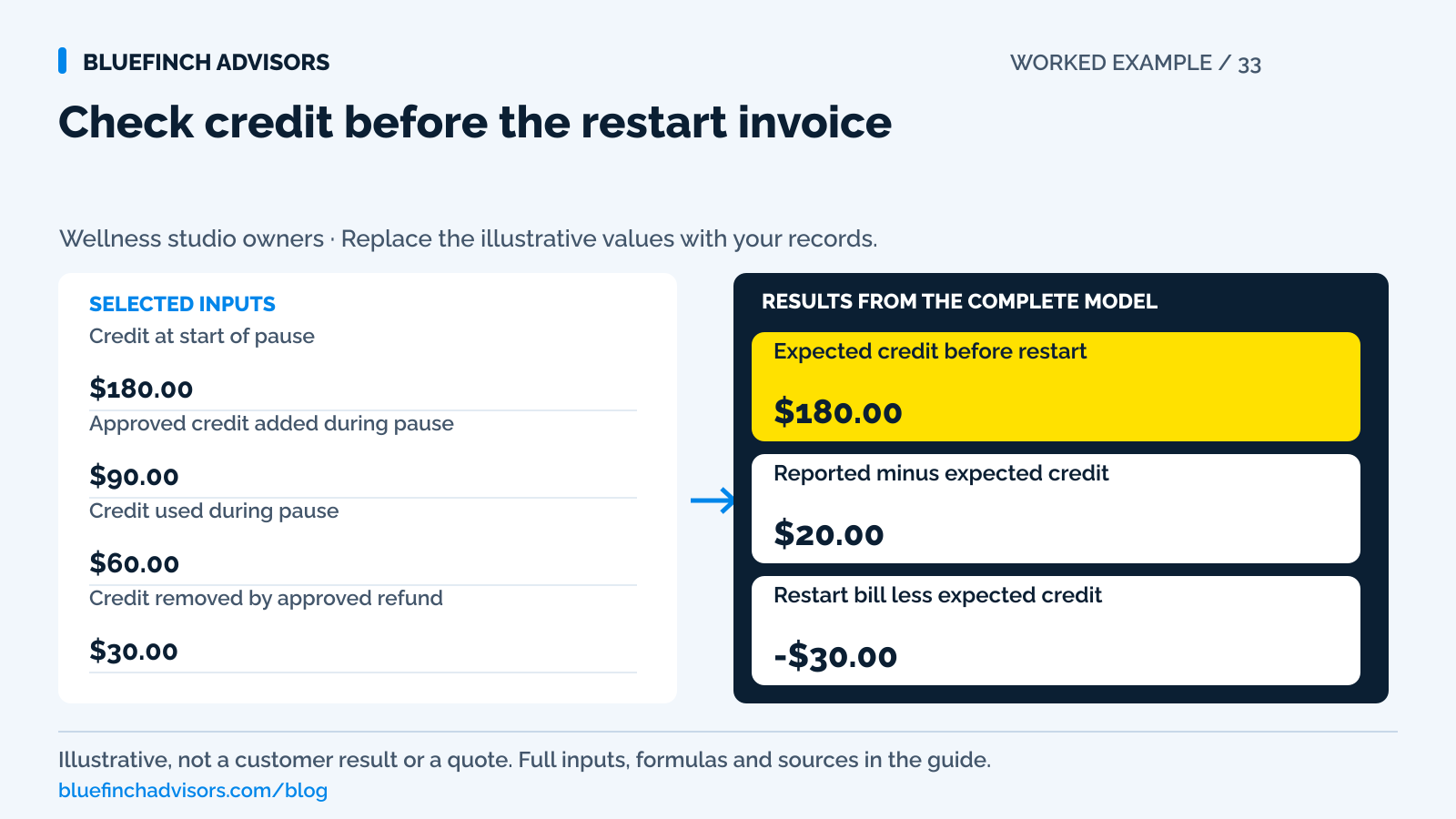
Expected credit before restart Opening credit plus approved grants less use and refunded value. | $180.00 |
Reported minus expected credit Nonzero means the system needs reconciliation. | $20.00 |
Restart bill less expected credit Positive means new amount due; negative means remaining credit after the bill. | -$30.00 |
Calculation detail
| Measure | Result |
|---|---|
| Approved credit additions | $90.00 |
| Use plus approved refund reductions | $90.00 |
| Resumed invoice before credit | $150.00 |
Model assumptions
- Illustrative dollar-credit policy; no expiration or fee is invented.
- Applying credit to the restart bill is assumed authorized. If calculated credit is negative, investigate before using the invoice outputs.
Read alongside these results
- A negative net bill denotes unused credit in this illustration, not an automatic cash refund.
- The model does not determine whether billing, access, or benefit accumulation should pause.
Download this worked example (CSV). Use the interactive version to export your own inputs and results.
Download infographic (PNG) · Download vector (SVG) · Link to the source and methodology


The short version
- Verify that billing stopped rather than relying on the frozen member label.
- Keep credit preserved during a pause separate from new cash payments.
- Check the first resumed invoice and credit remaining before activating the account.
A member pauses for six weeks. Staff mark the profile frozen, then later reactivate it. The next invoice is wrong: perhaps billing continued, a credit was granted twice, or the restart date created an unexpected partial charge. The membership's status label did not tell the full story.
This guide checks the payment and credit records around a pause. It does not prescribe cancellation rights, expiration, medical exceptions, or the terms your studio must offer. The example assumes an approved dollar-credit policy and uses fictional amounts. Session entitlements require a separate count ledger.
Use with this guide
Membership collections model
Measure declines after the correct billing file is established.
Package and membership terms
Document the approved pause and credit rules.
Software test scorecard
Verify pause and restart behavior with real account states.
Wellness renewals: reconcile billing dates and time zones
Test wellness membership renewal dates around month-end and time-zone changes. Use the billing-date register before changing a recurring collection schedule.
Browse the complete wellness center guides and worksheets.
Write down what the pause changes
The pause request should identify the effective date, expected restart date, billing behavior, booking access, benefit grants, and use of existing credit. A single frozen checkbox may not control all of those settings. Staff need the approved outcome in plain language before touching the account.
Gymdesk documents that freezing a member can stop check-in while payments continue unless the membership-freeze option is selected. It also provides separate options for credits, prorations, and extending a membership. These are software controls, not universal rules about what a member is entitled to receive.
Phorest describes a different workflow in which a frozen membership loses benefit access and billing resumes from the time it is unfrozen. The contrast is useful: never carry an assumption from one platform into another. Confirm the actual account settings and the member's agreement.
Sources for this section: Gymdesk: freezing, unfreezing, prorations, and credits · Phorest: refunds, freezes, membership status, and benefit balances
Capture the balance before the change
Save the opening credit and the last successful invoice before applying the pause. Record any charge that was already scheduled or processing. If the request arrived just before billing, check whether the platform can stop that particular transaction rather than assuming a profile change cancels it.
For credits granted during the pause, preserve the reason and approver. A credit for unused paid days is different from a goodwill credit and different again from a normal monthly benefit. Combining them without source references makes it difficult to explain the first resumed bill.
Do not translate unused sessions into dollars using the current menu price unless that conversion is actually authorized. A session count can be tracked with its own opening, grants, use, and closing count. The calculator is intentionally limited to a dollar ledger so it does not invent that conversion.
Sources for this section: Phorest: membership benefit rollover and accumulation settings
The sample member has $180 before the restart bill
The fictional opening credit is $180. Staff grant an approved $90 credit during the pause. The member uses $60 under the plan's permitted access terms, and an approved refund removes $30 of credit. Expected credit before restart is $180 plus $90, less $60 and $30: $180.
The platform shows $200, a positive $20 difference. Resolve that discrepancy before applying the next invoice. A duplicate adjustment or a missed redemption could explain it. Do not select whichever balance makes the client conversation easier without finding the underlying record.
The approved first resumed invoice is $150 before credit. Applying the expected $180 leaves a signed net of negative $30. In this illustration, that means $30 remains as credit and no new payment is required. It does not mean staff should automatically send a $30 refund.
Preview the invoice before switching to active
Confirm whether the system will bill immediately or return to the original schedule. Gymdesk's guidance distinguishes those choices and describes how a proration and a credit can interact. Review the preview with the approved dates and amount before completing a bulk reactivation.
For several paused members, avoid assuming that one setting is correct for everyone. One member may have paid through the next billing date while another has a failed payment still unresolved. Divide the reactivation list into compatible groups and keep individual exceptions out of the bulk action.
Send a concise confirmation using the actual approved result: restart date, next charge date, amount due, and credit remaining. Do not bury a change in terms inside a payment-update message. If the agreed policy is unclear, obtain a decision before resuming automatic collection.
Sources for this section: Gymdesk: freezing, unfreezing, prorations, and credits
Refunding the charge may not change the membership
Phorest states that a refunded or voided fee does not automatically change the membership balance or status. In a pause workflow, that can leave a member with both returned cash and an unchanged credit. Verify the payment and entitlement actions independently.
Track refunds as submitted, pending, completed, or failed using the provider's actual statuses. Stripe's documentation explains that available balance can affect refund processing. If a refund remains pending, do not create a second credit or cash payment as though the first action had never been taken.
Keep a short correction history rather than overwriting the balance without a note. The next person answering the member should be able to see the original credit, the approved change, and the final result. A trail of unexplained manual balance edits is not a durable pause process.
Sources for this section: Phorest: refunds, freezes, membership status, and benefit balances · Stripe: refund funding, destinations, and refund status
Keep a pricing change separate from a restart
If the studio introduces dual pricing while a member is paused, review the agreement and disclosures before applying any new amount at restart. The old credit remains a recorded promise. It should not disappear because the processor changed. Any newly authorized payment needs the applicable price shown clearly.
Have the provider demonstrate credit application followed by credit-card payment, debit payment, and a wallet-backed payment. Visa excludes debit and prepaid cards from surcharging and distinguishes posted-price discounts from checkout fees. A recurring charge is not automatically eligible credit merely because no card is physically present.
The next action is a single paused-account test in the proposed workflow: capture the opening credit, apply the approved pause, preview restart, and reconcile the first successful bill. Keep the existing membership-cost calculator for monthly decline economics. Use this ledger to prevent the wrong amount from being billed in the first place.
Sources for this section: Visa: U.S. merchant surcharging and displayed-price distinctions
Questions business owners ask
Does freezing always stop payments?
No. Platform behavior and selected settings differ. Confirm billing, access, and benefit behavior separately.
Can I cap old accumulated credits when changing systems?
A software setting is not permission to change an existing promise. Review the applicable agreement and requirements before altering balances.
What does a negative restart amount mean?
Under the illustrated credit policy, it means credit remains after the invoice. It is not an automatic cash refund instruction.
Primary sources
BlueFinch last reviewed these sources on October 2, 2026. Payment rules and state requirements can change.
- Gymdesk: freezing, unfreezing, prorations, and credits
- Phorest: refunds, freezes, membership status, and benefit balances
- Phorest: membership benefit rollover and accumulation settings
- Stripe: refund funding, destinations, and refund status
- Visa: U.S. merchant surcharging and displayed-price distinctions
Use this page for general business information. It is not legal, tax, or accounting advice.