Check the card types behind wallet sales
Find wallet volume still needing classification and compare reported credit sales with confirmed credit sales.
Use the interactive tool without signing up. It runs in your browser: enter your numbers, save a comparison, download results or print a working copy. Your numbers are not sent to BlueFinch.
Illustrative example inputs
These starting values show how the math works. They are not industry averages, customer results or a quote.
| Input | Example value |
|---|---|
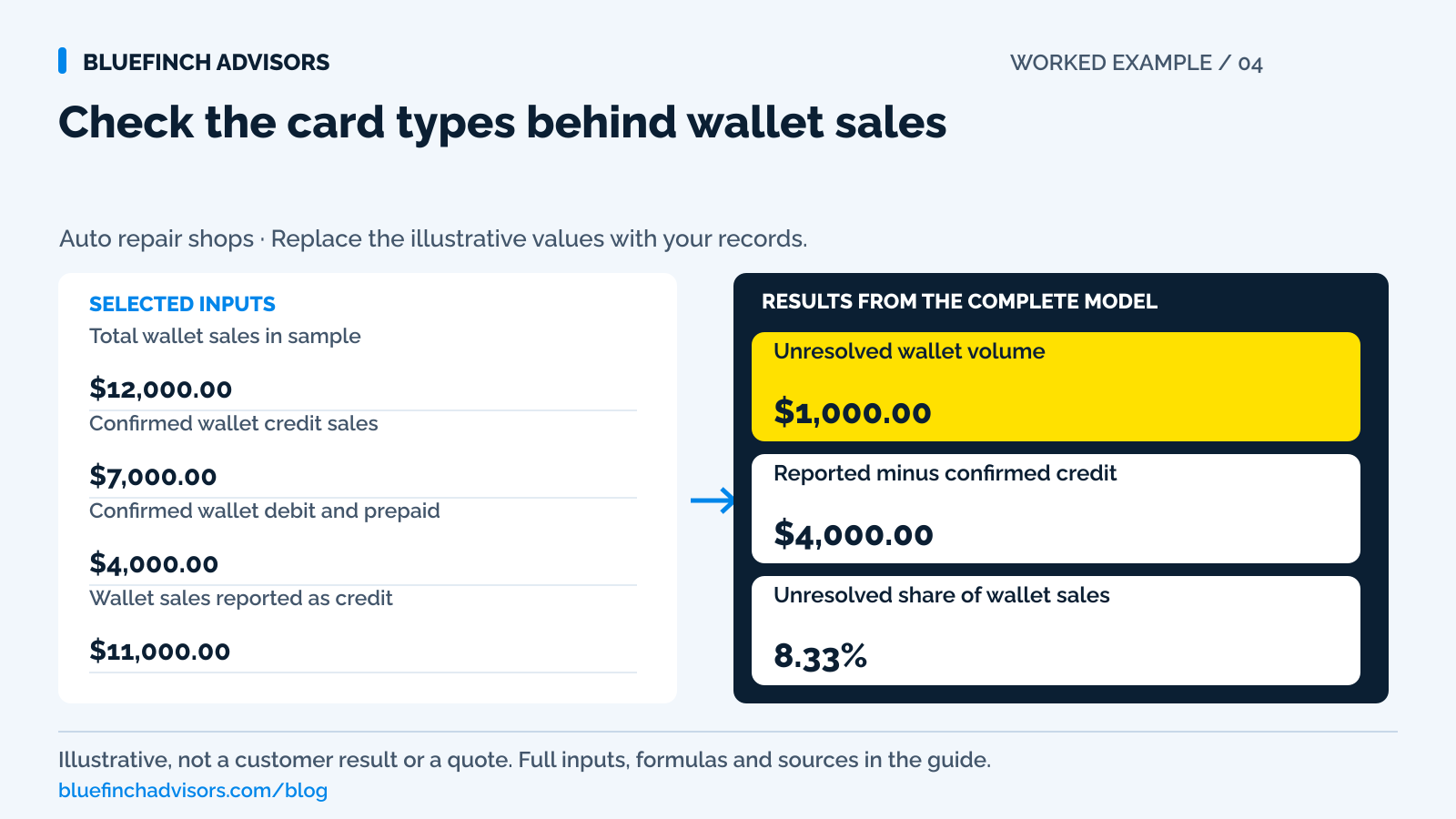
Total wallet sales in sample Choose a completed period and use it consistently. | $12,000.00 |
Confirmed wallet credit sales Use the processor's card-type detail, not a generic report label. | $7,000.00 |
Confirmed wallet debit and prepaid Enter non-credit funding separately. | $4,000.00 |
Wallet sales reported as credit Enter the credit total from the shop or accounting report you're checking. | $11,000.00 |
Example results
| Measure | Result |
|---|---|
Unresolved wallet volume A negative result means the classified amounts exceed total sample sales. | $1,000.00 |
Reported minus confirmed credit Check the difference, whether positive or negative. | $4,000.00 |
Unresolved share of wallet sales Shows Not available when total sales are zero. | 8.33% |
Calculation detail
| Measure | Result |
|---|---|
| Confirmed credit | $7,000.00 |
| Confirmed debit and prepaid | $4,000.00 |
| Confirmed classification total | $11,000.00 |
| Wallet sample total | $12,000.00 |
Model assumptions
- Defaults are examples. Use the same refund treatment and cutoff for every sales figure.
- Don't count a transaction as both credit and debit/prepaid.
- A difference needs investigation; it doesn't prove a customer was charged incorrectly.
Read alongside these results
- PIN use, wallet branding and a contactless payment don't establish credit eligibility.
- Negative results stay visible so you can resolve inconsistent inputs or reporting differences.
Download this worked example (CSV). Use the interactive version to export your own inputs and results.
Download infographic (PNG) · Download vector (SVG) · Link to the source and methodology

The short version
- Check the underlying card type rather than assuming a phone tap means credit.
- Debit without a PIN is still debit. Using a wallet doesn't make it surcharge-eligible credit.
- Resolve unknown wallet volume before using a credit-only cost or savings calculation.
The customer taps an iPhone for a $1,480 repair and leaves. The receipt says contactless. Later, the owner sees that transaction in a report labeled credit. Neither label, by itself, proves that the customer used a credit card. A reporting shortcut can turn into a pricing mistake if the shop treats every wallet payment as surcharge-eligible credit.
Ask the processor to confirm the underlying card type, then test how your approved pricing program handles it. Use masked transaction references and amounts for the review. Staff don't need a customer's full card number or wallet screenshot to check the shop's configuration.
Use with this guide
Identify the actual pricing model
Separate a surcharge from a displayed cash and card price program.
Test the classification handoff
Check terminal, remote link, receipt, and shop-software behavior.
Rebuild the cost comparison
Use the confirmed card mix and complete account charges.
Browse the complete auto repair guides and worksheets.
Record the wallet and underlying card type separately
Apple Pay can present a credit or debit card. Apple explains that its payment-card number differs from the physical card number and that a refund may need the Apple Pay number's last four digits. That helps explain a common counter mismatch: the plastic card in a customer's hand can show different final digits from the receipt for a phone payment. The mismatch alone is not evidence of a different purchase.
For the shop's audit, capture the channel as wallet or physical card and the confirmed funding type as credit, debit, prepaid, or unresolved. Keep those as separate fields. Contactless describes how a card credential reached the reader; it does not settle the funding-type question. Ask the processor which report or transaction detail exposes the underlying classification and whether the shop-management export preserves it.
Sources for this section: Apple: Refund purchases made with Apple Pay
No PIN doesn't mean a credit card
Visa's US surcharge guidance expressly excludes debit and prepaid purchases. It also explains that selecting credit on a terminal does not change a Visa debit card into a credit card. The selection can concern signature versus PIN routing. A customer authenticating a phone payment without entering a terminal PIN is therefore not a reliable reason to add a credit-card surcharge.
Dual pricing, a cash discount, and a surcharge are different pricing structures. This audit does not turn Visa's surcharge limit into a universal formula for a dual-price program. Have the provider identify the actual program and demonstrate its treatment of wallet-funded debit, wallet-funded credit, and prepaid. Local requirements and the merchant agreement also matter. A friendly name on a sales presentation is not enough to approve the behavior of the terminal.
Sources for this section: Visa: U.S. merchant surcharge questions and answers
Use a completed period and match transactions to receipts
Choose one completed settlement period with wallet transactions and no unresolved reporting cutoff. Export the total wallet sales and their transaction references, then ask for a funding-type classification for each one. Preserve refunds separately so the sample can be reconstructed. If the export uses a generic credit/debit label, do not guess the split from the card brand, wallet logo, transaction size, or the customer's choice of receipt.
Match the processor detail to the shop's credit-volume report. The exercise has two possible findings: the terminal may classify transactions correctly while a downstream report uses a loose label, or the pricing workflow itself may be wrong. Those are different repairs. A reporting fix should not be described as a refund correction, and a pricing error should not be closed merely because someone renamed a column.
Sources for this section: Visa: U.S. merchant surcharge questions and answers
A $12,000 wallet sample with $1,000 still unresolved
Assume a completed sample contains $12,000 of wallet sales. Processor detail confirms $7,000 as credit and $4,000 as debit or prepaid, leaving $1,000 unclassified. The shop's credit-volume report shows $11,000 of wallet credit. Its reported credit figure exceeds confirmed credit by $4,000, while 8.33% of wallet volume remains unresolved. These are illustrative amounts, not a claim about the typical wallet mix.
The $4,000 difference is an audit question, not proof that exactly $4,000 was charged incorrectly. Some of the unresolved volume could turn out to be credit, and the report may have its own cutoff or refund convention. Resolve those entries before calculating a corrected credit total. If actual receipts show an improper debit charge, build a transaction-level correction list rather than multiplying the entire difference by a guessed fee percentage.
Follow test payments through receipts and settlement
With the provider's approved test procedure, verify a wallet credit payment, wallet debit payment, and any supported prepaid case. Compare the displayed price, amount authorized, receipt lines, funding-type detail, and resulting settlement. If the shop sends payment links as well as taking phone taps, test those channels separately. A correct counter terminal does not establish that the hosted payment page uses the same configuration.
Include a customer changing payment method before confirming the charge. The amount should follow the approved program and stay understandable to the customer. Also check the shop-management record after payment. If the screen applies one price and the invoice records another, the accountant and service advisor inherit a reconciliation problem even when the processor's card classification is right. Keep the receipt set as evidence of the configuration that actually passed.
Sources for this section: Visa: U.S. merchant surcharge questions and answers
Find the original wallet payment before refunding
For an Apple Pay refund, start with the original transaction in the payment system. Apple's guidance says merchants may use the Apple Pay card number rather than the physical card number, and that the refund goes back to the payment card. Where the workflow needs the device, ask the customer to use the wallet on the device used for the purchase. Explain why the last four digits can differ before treating it as a mismatch.
Do not ask an advisor to photograph the full wallet or type card information into the repair-order notes. Keep masked references and the refund status. PCI SSC prohibits retaining verification codes after authorization; customer permission does not change that rule. Follow the provider's process if the original device or card is unavailable. Do not improvise a refund to a different person's card because it is easier to present at the counter.
Sources for this section: Apple: Refund purchases made with Apple Pay · PCI SSC: Card verification code storage · Stripe: Refund and cancel payments
Recalculate savings using confirmed card types
A payment program with a zero merchant rate on eligible credit transactions still needs a separate review of debit costs and other account charges. If wallet debit was mistakenly counted as credit volume, a savings projection may be overstated even when every customer price was correct. Rebuild the comparison using confirmed eligible volume, actual remaining fees, and the same period on both sides.
Do not assign all unresolved volume to the more attractive scenario. Keep it visible and run a range if the provider needs time to classify it: first treat none of it as eligible credit, then treat only the amount that could legitimately qualify. That range describes data uncertainty, not a promise about future savings. Once the transaction detail arrives, replace the range with the confirmed mix and preserve the original audit notes.
Sources for this section: Visa: U.S. merchant surcharge questions and answers
Explain wallet payments accurately at the counter
A useful response is: 'You can use the supported wallet. The payment system identifies the card type and shows the applicable price before you approve it.' Staff should avoid saying that Apple Pay is always credit, always free, or always the same price as cash. The right statement depends on the shop's verified program and supported tenders.
For the next monthly review, keep wallet volume as a channel subtotal and credit, debit, and prepaid as funding classifications. Assign unresolved items to the provider with a transaction reference and a due date. The audit is finished when those totals reconcile and the receipts reflect the approved treatment. Until then, leave the unknown amount visible instead of treating a confident label as a resolved payment fact.
Sources for this section: Apple: Refund purchases made with Apple Pay · Visa: U.S. merchant surcharge questions and answers
Questions business owners ask
Does tapping a debit card through Apple Pay make it a credit transaction?
No. Wallet presentation does not change the underlying debit card into a credit card. Have the processor confirm the funding classification and approved price treatment.
Does a reported credit excess prove customers need refunds?
No. It identifies a reporting or classification discrepancy. Review the actual prices charged and transaction detail before determining any customer correction.
Why do the receipt and physical card show different last four digits?
Apple Pay uses a different payment-card number from the physical card. The original transaction and the wallet number may be needed to locate and refund the payment.
Primary sources
BlueFinch last reviewed these sources on October 2, 2026. Payment rules and state requirements can change.
- Apple: Refund purchases made with Apple Pay
- Visa: U.S. merchant surcharge questions and answers
- PCI SSC: Card verification code storage
- Stripe: Refund and cancel payments
Use this page for general business information. It is not legal, tax, or accounting advice.