Reconcile two prepaid-value ledgers
Apply additions and reductions to each opening balance, then compare their combined total with the system export.
Use the interactive tool without signing up. It runs in your browser: enter your numbers, save a comparison, download results or print a working copy. Your numbers are not sent to BlueFinch.
Illustrative example inputs
These starting values show how the math works. They are not industry averages, customer results or a quote.
| Input | Example value |
|---|---|
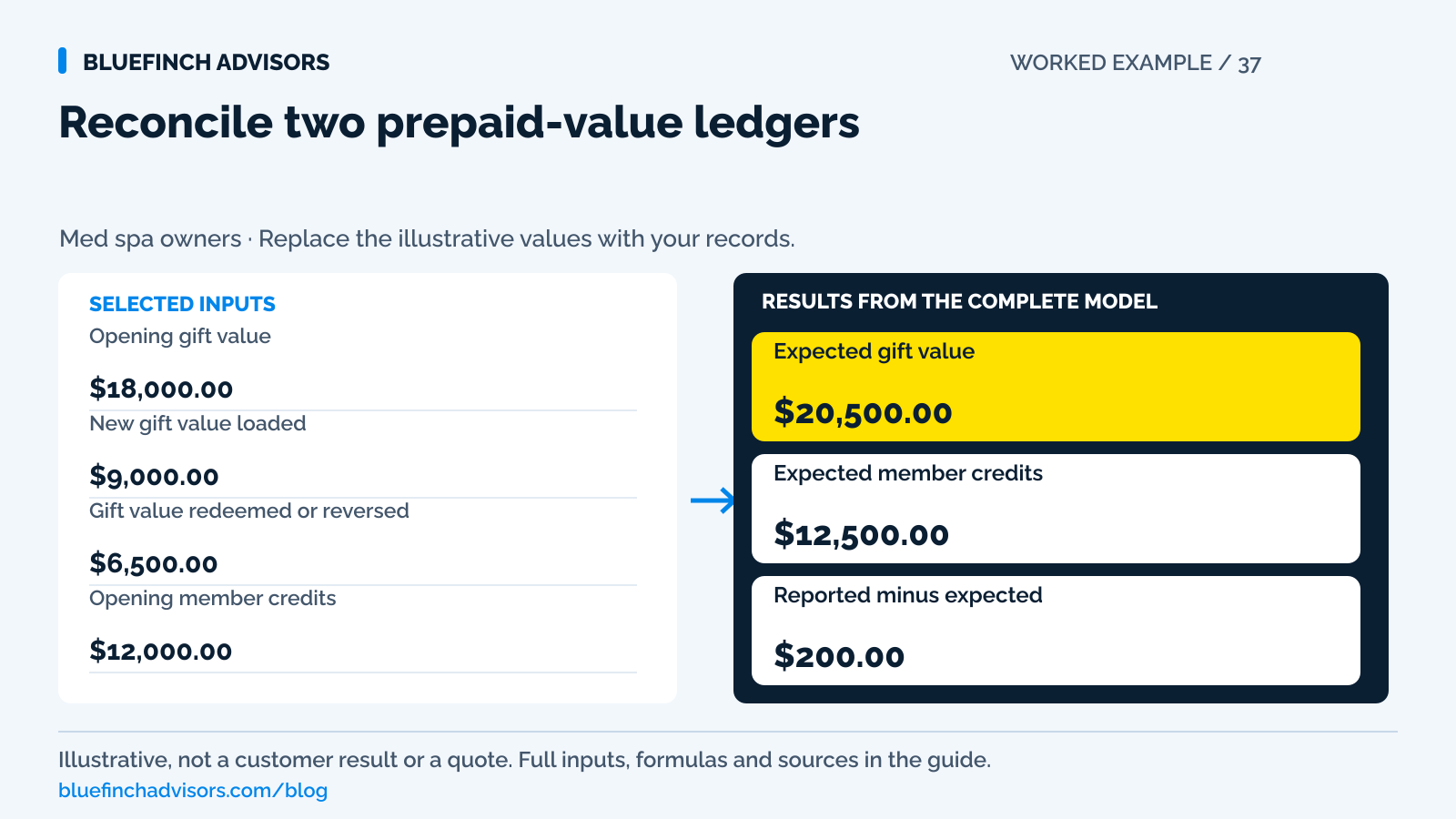
Opening gift value Outstanding face value at the same cutoff used for the previous close. | $18,000.00 |
New gift value loaded Value promised, including separately identified promotional loads. | $9,000.00 |
Gift value redeemed or reversed Verified reductions, excluding unsupported expirations. | $6,500.00 |
Opening member credits Dollar credits only. Keep session counts in a separate ledger. | $12,000.00 |
Member credits added Credits actually granted under the plans. | $6,000.00 |
Member credits used or reversed Approved, documented reductions. | $5,500.00 |
Combined system ending balance Closing export from the source systems, using the same cutoff. | $33,200.00 |
Example results
| Measure | Result |
|---|---|
Expected gift value Opening balance plus new loads less verified reductions. | $20,500.00 |
Expected member credits Credits remain separate from gift value. | $12,500.00 |
Reported minus expected A nonzero amount is an unresolved reconciliation difference. | $200.00 |
Calculation detail
| Measure | Result |
|---|---|
| Combined opening promises | $30,000.00 |
| Combined additions | $15,000.00 |
| Combined reductions | $12,000.00 |
Model assumptions
- Defaults are illustrative dollar balances, not accounting or reserve recommendations.
- Reductions must be authorized and supported. This model does not decide whether value may expire.
Read alongside these results
- A negative ending value is retained as an error signal. Investigate the underlying entries.
- Outstanding face value is not automatically the accounting liability or cash needed to fulfill it.
Download this worked example (CSV). Use the interactive version to export your own inputs and results.
Download infographic (PNG) · Download vector (SVG) · Link to the source and methodology


The short version
- Check the gift and member-credit ledgers separately before adding them together.
- For discounted gift cards, record both value loaded and cash received.
- Preserve the original promise and redemption history when payment pricing changes.
The bank deposit looks strong after a gift-card promotion. The next month's treatment schedule fills with clients using that value, but little new money reaches the bank. If your dashboard also mixes membership credits into the same prepaid total, you cannot tell which program created the work still owed.
Start with two operating ledgers. This guide checks outstanding dollar value, not tax treatment, revenue recognition, legal expiration, or the cash reserve your accountant may require. The calculator uses a fictional month to show whether the balances move correctly. A separate cost forecast is needed to fund the services clients can still redeem.
Use with this guide
Membership terms checklist
Confirm the promise behind each credit before adjusting it.
Payment integration scorecard
Test balance and refund handoffs in the proposed software.
Med spa processing-cost calculator
Measure fees against new settled card collections, not gift redemptions.
Browse the complete medical spa guides and worksheets.
Name what the client actually owns
A purchased $100 gift card, a $100 promotional voucher, and a membership benefit described as $100 of monthly credit are three different promises. Capture the program, purchase transaction, amount paid, value granted, permitted services, and any relevant terms. A free promotional balance should not silently become indistinguishable from purchased value.
Dollar credits and service counts also need different units. A remaining facial is not automatically a $150 cash credit because the menu lists a facial at $150 today. Keep the service entitlement intact unless an approved conversion is part of the client's agreement. Conversion decisions belong with your policy advisers. Staff should not invent them during checkout.
Phorest documents how membership benefits accumulate and how accumulation settings apply. That is evidence of software behavior, not a recommendation to erase balances. Your exported records should show the specific settings in force when credits were granted.
Sources for this section: Phorest: membership benefit rollover and accumulation settings
Do not make the loading report stand in for cash
Square's gift-card reporting distinguishes activations from sales: a $100 card sold for $80 appears as $100 of activated value but $80 of gift-card sales. That difference matters before you compare payments with your bank. Face value answers what can be redeemed. The purchase tender and settlement answer what was collected.
For a holiday promotion, retain the paid amount and bonus amount as separate fields even if the client sees a single balance. Otherwise a later refund request cannot be traced to the original amount paid. There is no justification for treating a promotional increment as an extra card payment when no such payment happened.
Use gross successfully collected card payments as the processing-volume basis, with payment costs shown separately. Do not substitute a net bank payout that already has fees or other adjustments deducted. A redemption is an application of prepaid value, not a second card sale. When the client buys an uncovered add-on, only that new charge belongs in new card volume. This prevents an apparently low effective processing rate caused by counting the same money twice.
Sources for this section: Square: gift card activity, outstanding balances, and inter-location reporting
Worked month: locate a $200 difference
The example begins with $18,000 of gift value. Add $9,000 of loads and subtract $6,500 of redemptions and documented reversals. Expected ending gift value is $20,500. The member-credit ledger begins at $12,000, adds $6,000, and removes $5,500, so its expected ending value is $12,500.
Together, the two ledgers should show $33,000. The exported system balance says $33,200. The calculator returns a positive $200 difference, meaning reported value exceeds the reconstructed value. It does not label that amount as fraud, income, or a customer debt. A late adjustment, duplicate imported credit, or cutoff mismatch could explain it. A combined match can also hide offsetting errors: gift value understated by $200 and member credit overstated by $200 would cancel in this check.
Find the first day the difference appears. Compare additions and reductions by transaction ID, then inspect any manual entries on that date. If the export includes a $200 credit posted after midnight while your activity file stops at the prior day's close, correct the cutoff and rerun. Do not insert a balancing write-off merely to make the month close.
A refund can leave the benefit untouched
Phorest states that refunding or voiding a membership fee does not automatically change the current benefit balance or membership status. Those changes must be made separately in that workflow. This is exactly the sort of detail a busy front desk can miss: the client receives money back while the credit remains available.
Create a paired review for every approved prepaid refund. One person verifies the payment outcome and its refund reference. The benefit record then shows the corresponding authorized reduction, with another staff member checking the result where staffing permits. For a partial resolution, the remaining promise should be understandable without reading a long email chain.
A booking cancellation may restore a service credit without moving cash. A cash refund may reduce the prepaid balance. Label those actions differently in reports. Otherwise a restored appointment can be mistaken for a refund and then refunded again.
Sources for this section: Phorest: refunds, freezes, membership status, and benefit balances
Protect old value when payment pricing changes
Before introducing dual pricing or replacing a processor, test a client who spends an old gift card and pays the remainder with debit. Also test a member using credit with a newly purchased retail product. Staff need to see which balance was applied and what new amount was authorized, with the applicable posted prices visible before checkout.
Do not apply a fresh card fee to prepaid value solely because the original buyer used a card. A redemption is not a new card authorization. Have the provider confirm how the specific approved program treats mixed tender, old balances, and any refund of the original transaction. Visa distinguishes properly displayed cash/card prices from adding a checkout fee. A surcharge cannot be imposed on Visa debit or prepaid transactions.
Compare processing proposals on actual new card collections, retaining debit, monthly, software, and other account costs. A zero eligible-credit processing rate does not make the prepaid program costless. The fulfillment obligation and the cost of accepting the original payment remain separate.
Sources for this section: Visa: U.S. merchant surcharging and displayed-price distinctions
Build a close the front desk can reproduce
At month end, save opening and closing exports, activity detail, and a short exception list with owners and dates. Restrict adjustment access to staff who need it. Keep full card details out of the worksheet. The transaction reference and masked identifier are sufficient for this operational match.
Choose five accounts to trace from purchase to current balance. Include a discounted gift card, a partly used gift card, a membership refund, a restored booking credit, and a manual adjustment. This small sample does not replace the full reconciliation, but it tests whether the summary actually describes events staff can explain.
Before relying on the combined check, compare expected gift value with the gift ledger's closing export and expected member credits with the member ledger's closing export. Resolve each ledger's differences separately. The immediate decision is whether the balance files are reliable enough for a processor or software change. If they do not reconcile, preserve access to the old ledgers and resolve the exceptions before declaring the migration finished. Bring the reconciled totals to your accountant for the separate questions of accounting classification and funding.
Sources for this section: Square: gift card transaction and transfer history
Questions business owners ask
Does the ending total tell me how much cash to reserve?
No. It measures dollar promises under the entered records. Fulfillment cost, refund exposure, timing, and accounting policy require separate work.
Can I combine free promotional credit with paid gift value?
You can show an overall client balance if the system supports it, but preserve each source and its terms underneath. Otherwise refunds and migration checks become unreliable.
Should a negative ledger be reset to zero?
Not automatically. A negative result flags reductions above recorded value. Check missing loads, duplicate redemptions, and cutoffs before making an authorized correction.
Primary sources
BlueFinch last reviewed these sources on October 2, 2026. Payment rules and state requirements can change.
- Phorest: membership benefit rollover and accumulation settings
- Square: gift card activity, outstanding balances, and inter-location reporting
- Phorest: refunds, freezes, membership status, and benefit balances
- Visa: U.S. merchant surcharging and displayed-price distinctions
- Square: gift card transaction and transfer history
Use this page for general business information. It is not legal, tax, or accounting advice.