Reconcile a combined two-location payout
Compare the funded transactions from each location with the combined bank deposit.
Use the interactive tool without signing up. It runs in your browser: enter your numbers, save a comparison, download results or print a working copy. Your numbers are not sent to BlueFinch.
Illustrative example inputs
These starting values show how the math works. They are not industry averages, customer results or a quote.
| Input | Example value |
|---|---|
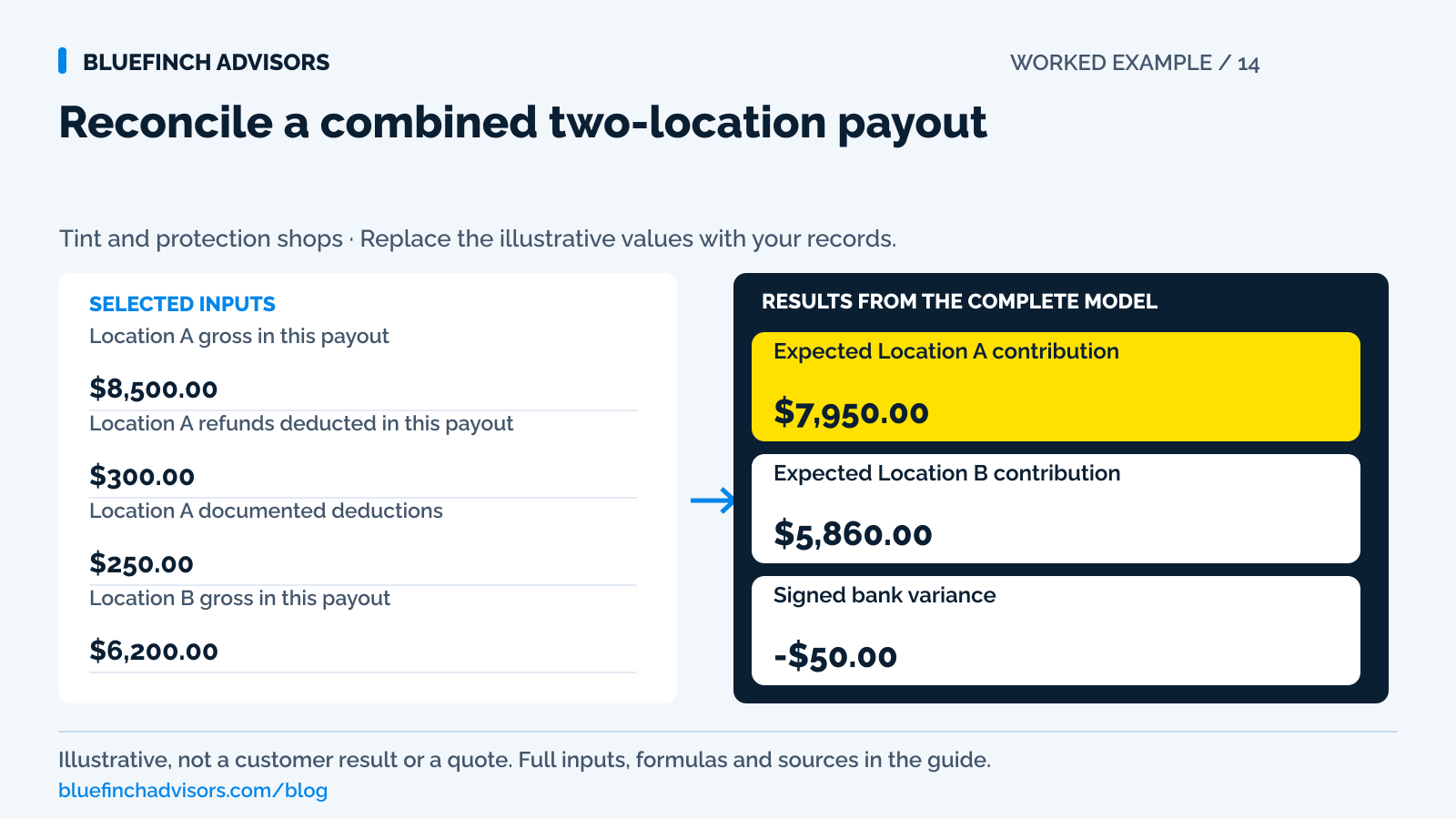
Location A gross in this payout Only captured transactions included in the identified payout. | $8,500.00 |
Location A refunds deducted in this payout Refunds actually included here, not every refund requested that day. | $300.00 |
Location A documented deductions Fees and other deductions included in this payout; exclude the refund input. | $250.00 |
Location B gross in this payout Matching funded transaction set for the second location. | $6,200.00 |
Location B refunds deducted in this payout Do not subtract the same refund at both locations. | $150.00 |
Location B documented deductions Same basis as Location A. | $190.00 |
Actual combined bank receipt The bank entry being reconciled, including only these payout components. | $13,760.00 |
Example results
| Measure | Result |
|---|---|
Expected Location A contribution Gross funded activity less included refunds and deductions. | $7,950.00 |
Expected Location B contribution Same calculation for the second location. | $5,860.00 |
Signed bank variance Negative means the bank receipt is below the explained payout. | -$50.00 |
Calculation detail
| Measure | Result |
|---|---|
| Expected combined payout | $13,810.00 |
| Included refunds | $450.00 |
Model assumptions
- Starting values are examples, not market benchmarks or payment quotes.
- Use one currency and a consistent before-tax basis. Work out taxes and program-specific adjustments separately.
Read alongside these results
- Use the same payout identifier, currency, and funding basis throughout.
- Transfers between separate entities, reserve releases, and adjustments must be explicitly reconciled; do not hide them in an unexplained fee total.
Download this worked example (CSV). Use the interactive version to export your own inputs and results.
Download infographic (PNG) · Download vector (SVG) · Link to the source and methodology

The short version
- Match a payout to the transactions it funds, not an unrelated day's sales.
- Track the service location separately from the merchant account that took payment.
- Keep positive and negative differences visible while checking refunds, deductions and timing.
One location collects a PPF deposit. A second location installs the film and takes the balance. Later, one bank deposit combines payments from both front desks and deducts a refund handled by the original branch. The owner's daily sales reports may all be correct while none equals the bank entry.
Start with the transactions actually funded in the payout. Enter each location's gross captured amounts, included refunds and documented deductions, then compare the expected total with the bank deposit. This checks a total; it doesn't authorize merging merchant accounts or transferring customer funds between separate businesses. Confirm the account and legal-entity structure first.
Use with this guide
Test multi-location payment records
Check deposit transfers, refunds, and usable payout exports.
Audit location payment costs
Use documented fees and the correct collected card volume.
Map every collection channel
Identify the account and location behind counter, booking, and remote payments.
Tint Wiz payment exports: verify the actual handoff
Test the actual Tint Wiz payment-to-accounting handoff. Use the acceptance sheet for deposits, balances, refunds and duplicate imports without assuming provider compatibility.
Browse the complete window tint guides and worksheets.
Track where the job was sold, performed and paid
Service location tells the owner where the job was performed. Sale origin tells the owner which team sold it. Payment location or merchant account tells accounting where money was collected. Those labels can differ without an error. Keep them separate when a customer books at one branch and completes at another. Otherwise moving the appointment may incorrectly move the original deposit in the revenue report or leave both branches claiming the same payment.
Confirm whether the locations belong to the same business and how the processor has configured their accounts and descriptors. Stripe's dispute-prevention guidance cautions against using one account for separate businesses and recommends recognizable statement descriptions. That does not prescribe every multi-location setup, but it is a reason to obtain provider confirmation rather than treating a shared bank account as permission to process every location through any available terminal.
Sources for this section: Stripe: payment policies, shipping records, and dispute prevention
Use the payout's transaction set rather than yesterday's bookings
A sales day can include uncaptured authorizations, late batches, refunds requested but not processed, and transactions funded later. A payout can include activity from several days. Reconcile the bank entry to the provider's funded transaction report first, then link those payments back to jobs and locations. Comparing today's scheduled revenue with tomorrow's bank deposit is not a reliable cash control, even if the totals occasionally happen to match.
Stripe's payout reconciliation documentation provides itemized reporting associated with payouts and separately identifies ending unsettled balances. Its authorization documentation explains that an uncaptured hold is a different state from a completed payment. Ask the shop's provider which fields identify batch, capture, payout, and bank arrival. Staff need those meanings in the closing procedure; merely exporting a report labeled payments does not establish which stage it represents.
Sources for this section: Stripe: payout reconciliation reports · Stripe: separate authorization and capture
The sample bank receipt is $50 below the explained payout
Location A contributes $8,500 of gross captured activity in the selected payout. Subtract $300 of included refunds and $250 of documented deductions to get $7,950. Location B contributes $6,200, less $150 of refunds and $190 of deductions, giving $5,860. Expected combined funding is $13,810. The actual bank receipt is $13,760, producing a signed variance of negative $50.
Do not label that $50 a processing fee without evidence. It might be an omitted adjustment, a different transaction set, a failed component, or a data-entry error. Find the provider record and classify it correctly. If it is a documented additional deduction, add it to the appropriate location or shared adjustment record and rerun the comparison. If the bank receipt is larger, keep the positive variance visible while checking for a reserve release, another payout, or an incorrect starting total.
Return money through its original payment record
A customer may request a refund at the branch nearest home even though the original card charge belonged to the other branch. Find the original payment before refunding. Do not have one location hand out cash while another later processes the card refund from an email request. Maintain one refund owner, reference, amount, and status, with the service location recorded separately for management reporting.
Stripe's refund documentation says refunds return to the original payment method and can be pending or fail. Verify the shop's provider and permissions for cross-location staff. If a refund is included in a later payout, deduct it there rather than in the original payment's historic bank reconciliation. The job ledger can show the customer's remedy date while the cash reconciliation uses the actual funding date; both records can be correct when their purposes are explicit.
Sources for this section: Stripe: refund destinations, partial refunds, and refund status
Test the same customer price at both branches
If the locations share a dual-pricing offer, verify that each quote, terminal, booking page, and receipt uses the approved customer-price logic. A customer moving an appointment should not discover that a second branch adds an unexplained amount to an already approved package. If local pricing or services differ legitimately, approve the revised scope and amount before the transfer becomes a collection issue.
A surcharge program needs its own compliant configuration at each supported channel; Mastercard excludes debit and prepaid from its surcharge permissions. A wallet payment taken at the second branch still needs its funding type handled correctly. Do not infer eligibility from which branch or device took the transaction. When reviewing a proposal with a 0% eligible merchant credit-card rate, keep debit, monthly, and other account-specific costs visible by the account that actually incurs them.
Sources for this section: Mastercard: merchant surcharge rules and debit exclusions · Visa: merchant fees, rules, and surcharge disclosure
Assign someone to explain each payout difference
Save the payout identifier, provider export, bank entry, location mapping, documented deductions, and any unresolved variance. Assign a reviewer who did not prepare the original location totals where staffing permits. A small unexplained difference repeated every day becomes difficult to reconstruct at month end. Set a practical review deadline and preserve the original calculation when an adjustment is made.
Run one cross-location job through the procedure: deposit at A, completion at B, final payment, and a test of the documented refund path without issuing an unnecessary live refund. The calculator cannot allocate revenue between entities, select accounting entries, or determine tax treatment. It shows whether the entered totals reconcile. The payout references explain whether the entries are correct. Once the variance is explained and the job ledger agrees with the original payment references, the owner can close the day without forcing the bank number to equal a sales report it was never meant to match.
Questions business owners ask
Should every location's daily sales equal its bank deposit?
No. Funding timing, combined payouts, refunds, and deductions can separate those totals. Reconcile the exact funded transaction set before comparing it with sales activity.
Where should a cross-location refund be recorded?
Against the original payment and the payout where it actually affects cash. Keep the service and handling locations as separate reporting fields rather than creating duplicate refunds.
Can we put an unexplained difference into fees to finish closing?
No. Preserve the signed variance until a provider record or corrected input explains it. An unsupported fee entry hides the exception rather than reconciling it.
Primary sources
BlueFinch last reviewed these sources on October 2, 2026. Payment rules and state requirements can change.
- Stripe: payment policies, shipping records, and dispute prevention
- Stripe: payout reconciliation reports
- Stripe: separate authorization and capture
- Stripe: refund destinations, partial refunds, and refund status
- Mastercard: merchant surcharge rules and debit exclusions
- Visa: merchant fees, rules, and surcharge disclosure
Use this page for general business information. It is not legal, tax, or accounting advice.