Check payouts during the processor switch
Work out what each processor should pay out, then compare it with the matching bank deposits.
Use the interactive tool without signing up. It runs in your browser: enter your numbers, save a comparison, download results or print a working copy. Your numbers are not sent to BlueFinch.
Illustrative example inputs
These starting values show how the math works. They are not industry averages, customer results or a quote.
| Input | Example value |
|---|---|
Old account captured sales Enter the final old-account batches you're checking. | $12,400.00 |
Old account refunds Count only refunds deducted from these payouts. | $600.00 |
Old account deducted fees Exclude fees billed separately later. | $340.00 |
Old account reserve held Enter the documented reserve withheld from these payouts. | $500.00 |
New account captured sales Enter the first matching new-account batches. | $8,600.00 |
New account refunds Count refunds deducted from the selected payouts. | $0.00 |
New account deducted fees Enter the known deductions from these payouts. | $230.00 |
Old account bank deposits Find deposits using their payout references. | $10,960.00 |
New account bank deposits Match payout references, not dates alone. | $8,170.00 |
Example results
| Measure | Result |
|---|---|
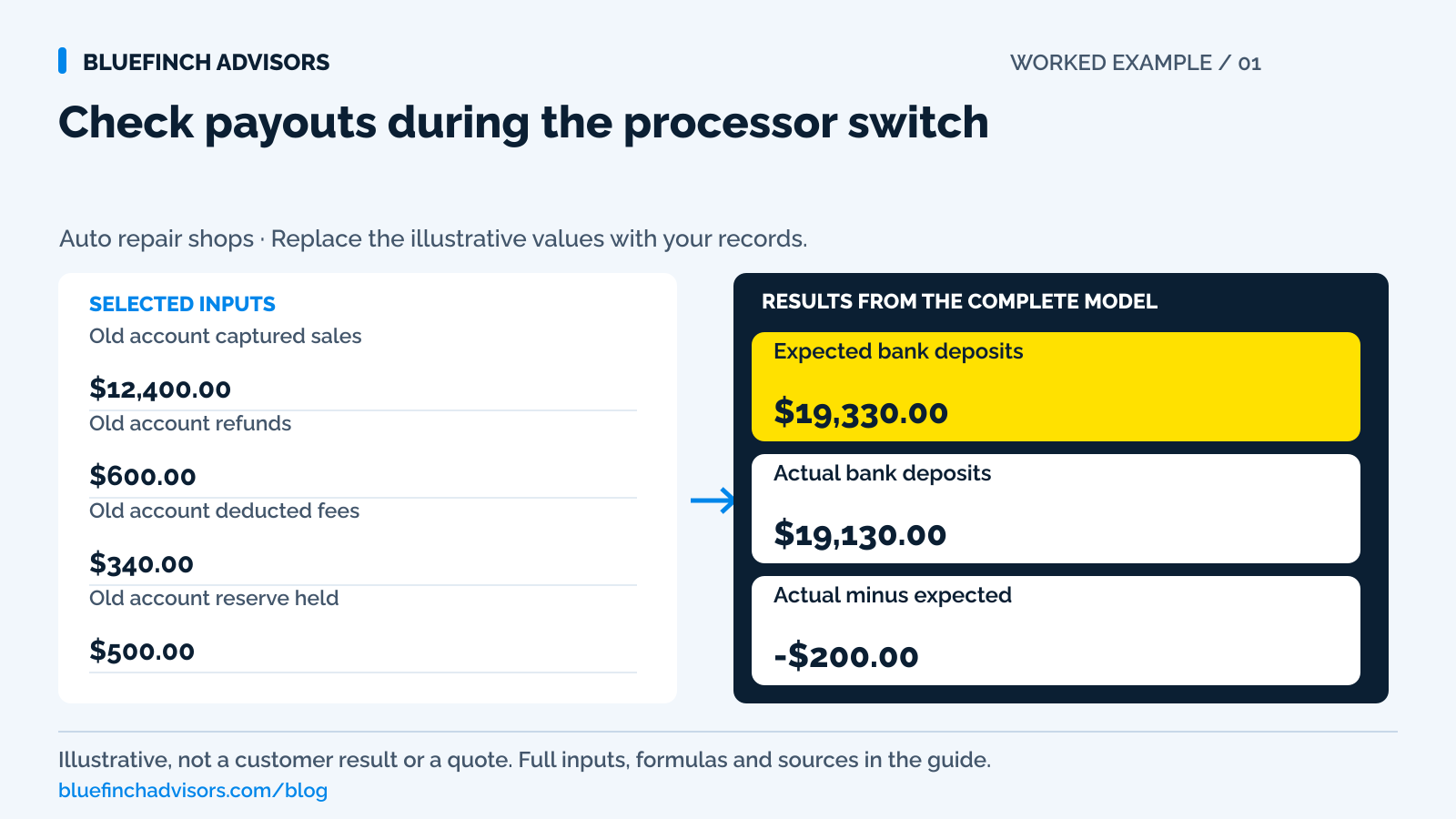
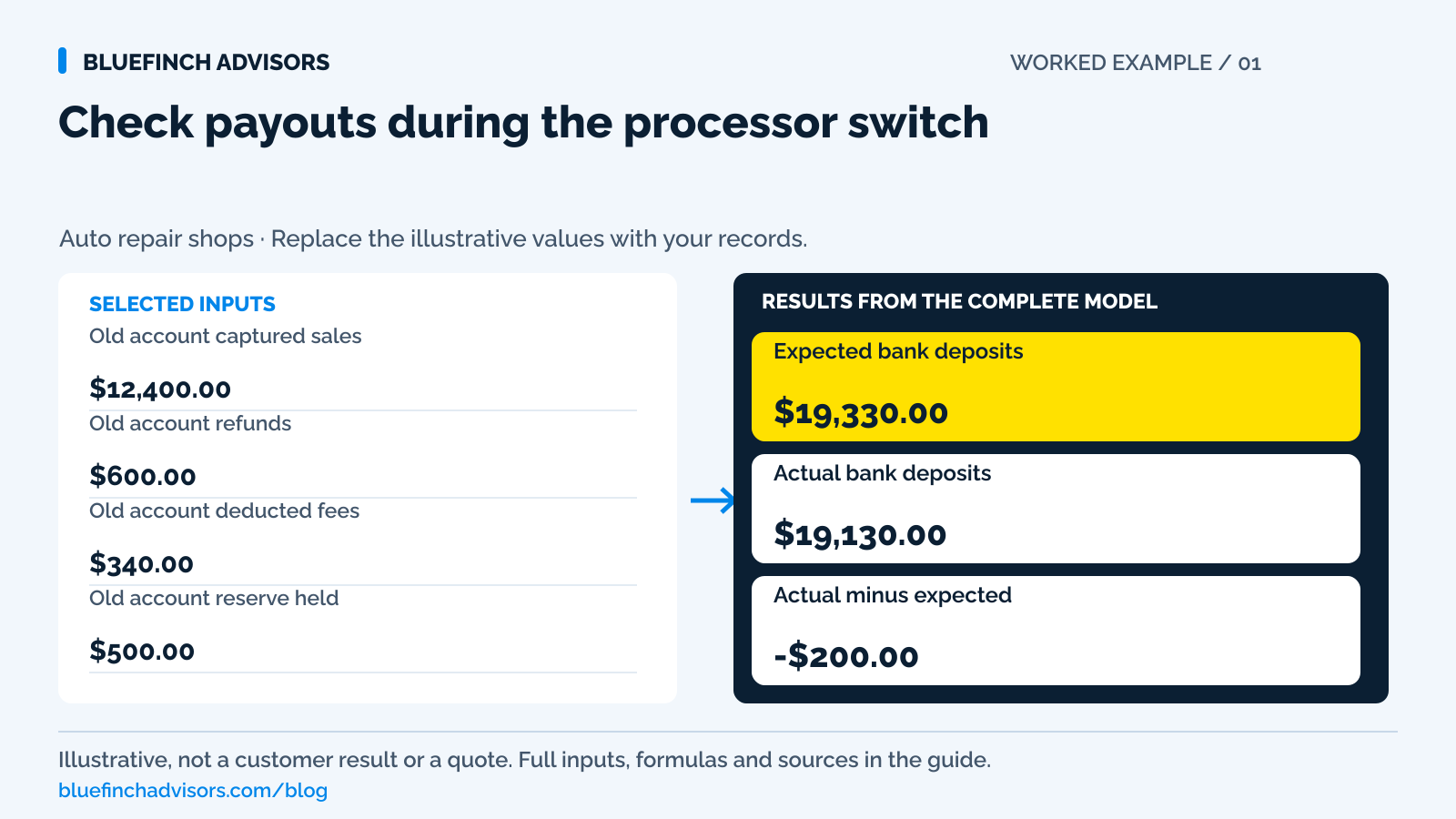
Expected bank deposits Captured sales less entered deductions. | $19,330.00 |
Actual bank deposits Money received for the selected payouts. | $19,130.00 |
Actual minus expected A negative value is an unexplained shortage or timing item. | -$200.00 |
Calculation detail
| Measure | Result |
|---|---|
| Old account expected payout | $10,960.00 |
| New account expected payout | $8,370.00 |
| Old account difference | $0.00 |
| New account difference | -$200.00 |
Model assumptions
- Defaults are examples. Match batches and bank deposits covering the same transactions.
- There's a separate field for the old-account reserve. Include documented other adjustments in deductions before comparing.
- This checks payouts, not customer balances or gross repair sales.
Read alongside these results
- Positive and negative differences stay visible. A zero difference means the entered numbers match; it doesn't validate every transaction.
- Ask each provider to confirm settlement dates, pending refunds, reserves and account-closure terms.
Download this worked example (CSV). Use the interactive version to export your own inputs and results.
Download infographic (PNG) · Download vector (SVG) · Link to the source and methodology

The short version
- Keep each payment's original processor reference, even if you collect the balance through the new account.
- Match each bank deposit to its processor batches. Today's repair sales may reach the bank on another day.
- Before canceling the old account, confirm how you'll retrieve records and issue refunds.
Before you cancel the old processor account, find every open repair order with a deposit on it. Those payments still count. A customer who paid on Friday may owe a final balance on Monday, after you've started using the new terminal. Meanwhile, Friday's payout may still be on its way to the bank. If last month's engine job needs a refund, you'll also need a way back to that original payment.
The worksheet checks the last old batches and the first new ones. Start with captured payments, subtract amounts actually withheld from those payouts, then compare the result with the bank. Keep customer balances on the repair orders where your service desk already tracks them. Here, you're checking whether the shop received the money due and who will follow up on anything missing.
Use with this guide
Test the new integration
Check that repair-order references, receipts, and refunds survive the new workflow.
Audit a normal statement
Compare complete account costs after overlapping transition items are separated.
Preserve dispute evidence
Keep the repair and authorization record alongside historical payment references.
A repair shop CRM for declined work, without repeated sales calls
A declined-work list needs a named owner and a next action. Check how many follow-ups your front desk has time to complete.
Set a repair-shop loyalty reward without discounting your labor away
A redeemed reward has a cost even when the customer already planned to return. Check the credit against the contribution left on the job.
Separate the driver, vehicle and payer in your repair-shop CRM
The person dropping off a car is not always the person approving repairs or paying the invoice. Record each role before the first callback.
A service-advisor handoff sheet for calls awaiting repair approval
Waiting for approval needs an owner and a next action. Give the next service advisor enough context to make the right call.
Clean duplicate repair-shop customer records before sending reminders
Two records sharing a phone number are not automatically the same customer. Review the identity, service history and contact restrictions first.
Browse the complete auto repair guides and worksheets.
Record when new payments switch accounts
Pick a date, time, and time zone for sending new payments to the new account. Write down both merchant-account identifiers, the last old batch, and the first new transaction. Give the front desk that record. Otherwise, an advisor using an old terminal or a customer opening yesterday's text link can send a payment somewhere you weren't expecting. A calendar date by itself won't explain which account received it.
Before disabling an old payment request through the provider's approved process, check whether it was paid, is still awaiting payment or has been replaced. Clearly mark devices that should no longer take new sales. Give advisors a recorded status so the next person answering the phone doesn't have to guess.
For each open job, carry the old deposit forward as an existing payment credit. If the customer has paid $600, that credit stays on the repair order with the old transaction reference. Running the $600 again to put it in the new dashboard would charge the customer twice. Stripe's migration guidance calls for continued access to historical reports and a workable refund and dispute process. Ask the old provider how that access will work before terminating the account.
Sources for this section: Stripe: How to switch payment processors
A paid repair order and a bank deposit show different things
Your advisor can correctly mark a job paid before its card payment reaches the bank. The repair order shows what the customer bought and how much is still owed. To find out when that payment becomes shop cash, follow its transaction reference into the processor report, then follow the payout reference to the bank entry. The table below shows the identifiers worth keeping. Trying to make all these records share the same daily total can create an error where there was only a timing difference.
During the overlap, check how each account collects fees. Some deduct them from daily payouts; others bill separately each month. Enter only deductions taken from the selected payouts in this worksheet. Don't subtract a fee again from the monthly statement if you've already counted it here. List reserves, refunds, disputed amounts and funding corrections separately to explain each deduction. These entries don't change the customer's repair-order balance.
| Record | What it proves | Useful identifier |
|---|---|---|
| Repair order | Customer balance after payments | Repair-order number |
| Processor batch | Captured payments and deductions | Processor plus batch ID |
| Bank deposit | Money received | Payout reference and posting date |
Sources for this section: Stripe: How to switch payment processors
Example: the new payout is $200 short
The worksheet starts with an illustrative old-account batch of $12,400 in captured sales. It has $600 in refunds, $340 in fees deducted from the batch, and a $500 reserve hold. After those deductions, the old provider should pay out $10,960. On the new account, $8,600 in captured sales, no refunds, and $230 in deducted fees leave an expected payout of $8,370. Together, the expected bank deposits are $19,330. These figures are a worked example, not a processor quote.
Now compare the bank entries. The old provider deposited $10,960, exactly as expected. The new provider deposited $8,170. Total cash received is $19,130, so actual minus expected is negative $200. You can now take a specific question to the new provider about its payout instead of asking both providers to explain a combined sales total.
Open the new payout's adjustment detail and check whether the deposit was split or part of it is scheduled for another funding date. Don't call the $200 a fee until a record supports that explanation. If the provider documents a $200 adjustment, enter that deduction in the worksheet and retain the supporting reference. The captured sales figure should stay as recorded.
Confirm how you'll refund old payments
Start a refund by finding the original receipt. The charge belongs to the provider that processed it, even if another terminal now sits on the counter. Ask that provider how you'll issue refunds after new sales stop, which balance or bank account will fund them, and what access the office needs to keep. Get that answer before a customer is waiting for money back.
Stripe returns refunds to the original payment method and does not return the original processing fee. Check your own account's terms; another provider may handle fees differently. Before sending money again, check for an open dispute or an earlier refund that's still pending.
Taking a new payment and immediately refunding it won't repair the old transaction. It creates an unrelated sale and may incur another fee, leaving the customer with a confusing statement. Use the old provider's documented exception process if the normal refund route is unavailable. Keep the case number with the original payment reference, refund amount, status, and eventual debit so the next person answering the customer's call can see what happened.
Sources for this section: Stripe: Refund and cancel payments
Test whether the office can find an old payment
Download statements, batch summaries, payout reports, receipts, and masked transaction references into the shop's controlled records system. Record any open dispute deadlines there too. Before relying on the export, try finding a payment by repair-order number and transaction date. If the only way to answer a customer's question is to open every PDF in a folder, the export needs more organization.
Preserving payment history doesn't require a spreadsheet of full card details. Saved tokens may not transfer between providers; let the providers handle any approved migration. PCI SSC prohibits keeping card verification codes after authorization, even with customer permission. Record the systems involved, who needs access and which references retrieve the records. Keep payment credentials within the approved provider process.
Sources for this section: PCI SSC: Card verification code storage · Stripe: How to switch payment processors
Check both accounts at closing during the first week
Compare the day's final repair-order payments with captured sales on both accounts. Look into a repair-order reference that appears twice, a payment with no repair order, or a job whose old deposit hasn't carried through correctly. An advisor may be able to explain an unexpected old-account payment simply by checking which link the customer used. The bookkeeper can then trace that payment to its payout.
At the next bank review, match payouts that were due and leave later funding items open until their scheduled dates. A payment awaiting normal funding isn't the same as one that never captured. For a late deposit, save the promised date and provider's response with the transaction reference.
Give one person responsibility for the daily total. A short exception log is enough if it includes the amount, processor, person following up, expected resolution date, and next check. Advisors can resolve their own tickets, but someone needs to see whether the entire day balances. Keep an item on that list until you have evidence that it is resolved. Being told the processor is looking into it is a status update, not a reason to delete the row.
Sources for this section: Stripe: How to switch payment processors
List the obligations still tied to the old account
Once the last old batches and first new payouts match the bank, check the customer side of the changeover. Old deposits should still reduce the correct repair-order balances, staff should be able to retrieve historical records, and the office should know how to issue a normal refund. A reserve may still be held or a dispute window may remain open. Those obligations need a person responsible for them, written follow-up dates, and enough account access to act.
Don't judge the new processor's effective rate from the overlap week. It can include double monthly fees, old deposits arriving late, equipment charges, and reserves. Finish tracing those amounts, then use a complete normal statement for the cost comparison in BlueFinch's effective-rate guide. Before closing any remaining account access, send unresolved payout differences to the provider with their transaction references. It's much easier to pursue the missing money while you can still open the report that shows it.
Sources for this section: Stripe: How to switch payment processors
Preserve the customer's agreed price during the switch
If the move also introduces dual pricing, a cash discount, or a surcharge, record when that program starts. It may not be the same moment you turn on the new terminal. A deposit taken under the previous price presentation needs to remain attached to that history. Keep its receipt unchanged. Before collecting the balance on the first job that spans the switch, ask the provider how the old deposit and new final payment should appear together.
Visa distinguishes a discount offer from a surcharge added to a displayed price and excludes debit and prepaid from credit-card surcharging. Have the provider demonstrate the actual approved program on new payments, including wallet-funded debit and partial refunds. Keep those test receipts with the changeover records. Balancing the bank tells you where the money went. You still need to check that the customer saw and paid the correct price.
Sources for this section: Visa: U.S. merchant surcharge questions and answers
Questions business owners ask
Do I need to run an old deposit through the new terminal?
No. Leave the deposit as a payment credit on the repair order, with its original processor reference. Request only the balance the customer actually still owes. Changing providers is not a reason to charge that deposit again.
What if the bank received more than the worksheet expected?
That gives you a positive difference to investigate. Check for a reserve release, another batch in the deposit, a sale omitted from the worksheet, or a deduction entered incorrectly. Don't book the difference as extra revenue just because it is positive.
When can I cancel the old account?
Ask the provider what cancellation will mean for refunds, disputes, held reserves, statement access, and contract charges. Cancel only when the shop has a workable way to handle what remains. A working new terminal doesn't settle those old-account obligations.
Primary sources
BlueFinch last reviewed these sources on October 2, 2026. Payment rules and state requirements can change.
- Stripe: How to switch payment processors
- Stripe: Refund and cancel payments
- PCI SSC: Card verification code storage
- Visa: U.S. merchant surcharge questions and answers
Use this page for general business information. It is not legal, tax, or accounting advice.