Check cash available by your payment deadline
Compare cash before a batch arrives, after an on-time net payout and after an optional faster-transfer fee.
Use the interactive tool without signing up. It runs in your browser: enter your numbers, save a comparison, download results or print a working copy. Your numbers are not sent to BlueFinch.
Illustrative example inputs
These starting values show how the math works. They are not industry averages, customer results or a quote.
| Input | Example value |
|---|---|
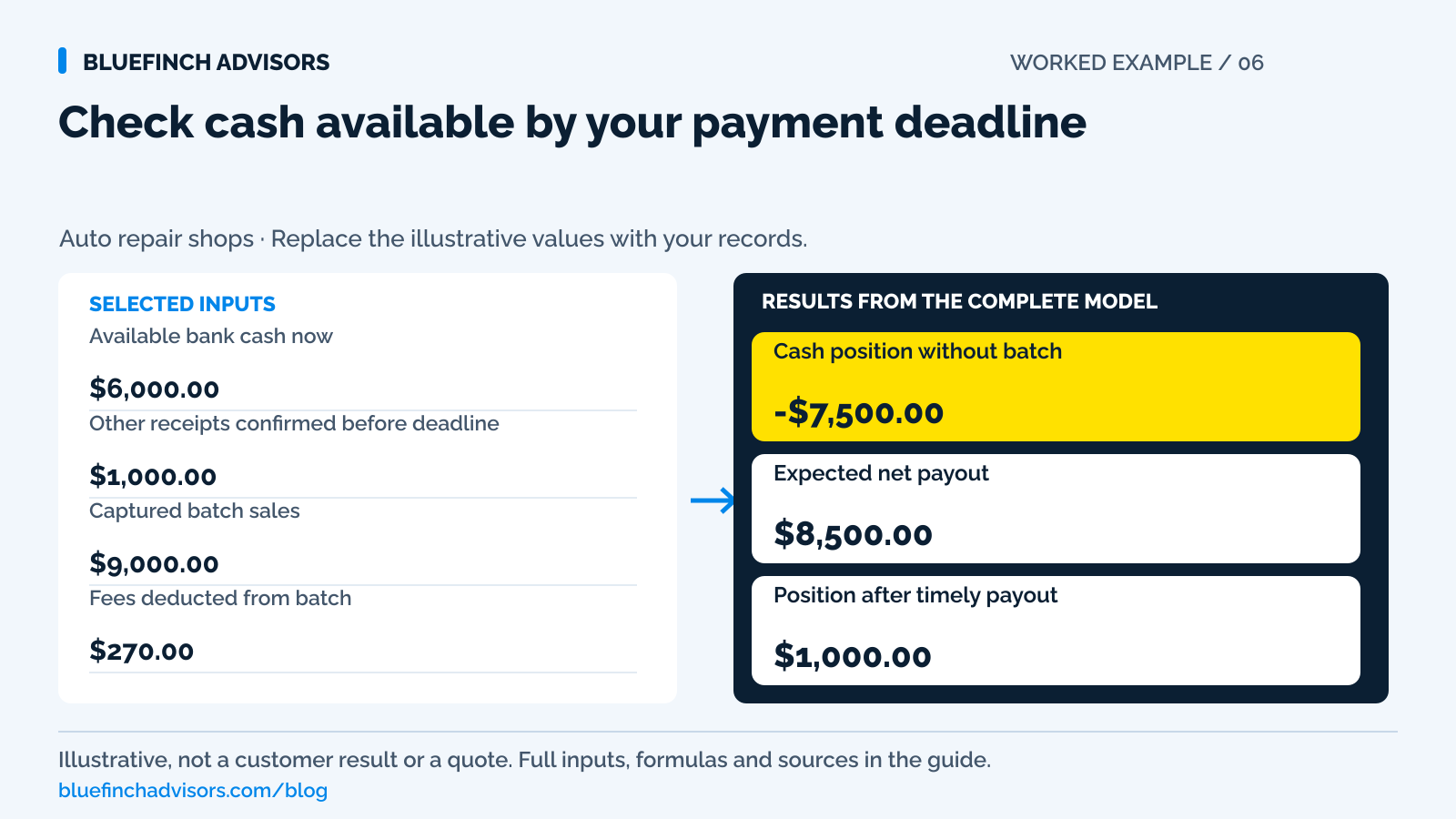
Available bank cash now Leave out unavailable deposits and cash already committed. | $6,000.00 |
Other receipts confirmed before deadline Count receipts only when you've verified their availability. | $1,000.00 |
Captured batch sales Exclude authorizations and unpaid invoices. | $9,000.00 |
Fees deducted from batch Leave out separately billed fees unless they're due in this period. | $270.00 |
Other batch deductions or holds Enter the documented amount withheld. | $230.00 |
Obligations due by deadline Check the exact period and times payments are due. | $14,000.00 |
Separate upcoming refund reserve Don't count refunds already deducted a second time. | $500.00 |
Optional faster-transfer fee The sample percentage applies to the full net payout. | 1.5% |
Example results
| Measure | Result |
|---|---|
Cash position without batch A negative result means there's a shortfall without the payout. | -$7,500.00 |
Expected net payout Subtracts entered deductions from captured sales. | $8,500.00 |
Position after timely payout Applies only if the payout arrives before payment is due. | $1,000.00 |
Optional faster-transfer cost An extra fee on the net payout entered. | $127.50 |
Calculation detail
| Measure | Result |
|---|---|
| Confirmed cash excluding batch | $7,000.00 |
| Obligations plus separate reserve | $14,500.00 |
| Net after optional transfer fee | $8,372.50 |
| Position after faster transfer | $872.50 |
Model assumptions
- Defaults are examples. The 1.5% faster-transfer rate isn't a provider quote.
- Count an after-payout scenario only if the entered net amount is eligible and available before the deadline.
- The tool can't predict business-day schedules or bank posting times.
Read alongside these results
- If net payout is negative, deductions exceed sales. Resolve those inputs before using the transfer-fee scenario.
- Check exact cutoffs, eligibility, the fee basis, bank availability and holidays separately.
Download this worked example (CSV). Use the interactive version to export your own inputs and results.
Download infographic (PNG) · Download vector (SVG) · Link to the source and methodology

The short version
- Use the actual cash deadline, down to the time of day. A next-day funding label isn't enough.
- Allow for batch deductions and known refunds before counting card sales as available cash.
- Confirm eligibility and how much can arrive on time before pricing faster funding.
Friday can be the shop's strongest collection day and still leave Monday morning tight. Customers have paid, the repair orders are closed, and the dashboard shows a healthy sales total. The supplier debit or payroll withdrawal may arrive before the card payout. The problem is timing, not necessarily sales or profitability.
Check the cash needed between Friday close and your next payment deadline. Enter available bank cash, confirmed other receipts, the expected net payout and obligations due by that deadline. Verify the funding date and time with the provider and bank. Closing a terminal batch doesn't give the calculator that information.
Use with this guide
Review large-job deposit timing
Connect customer payment milestones to the shop's actual commitments.
Include funding fees in account cost
Separate the transfer-speed charge from the base processing quote.
Check batch and settlement reporting
Verify how counter and remote channels feed the funding schedule.
Offline repair-shop payments: check status before pickup
Review offline repair-shop card payments before vehicle pickup. Track device status, provider upload limits and confirmed payment outcomes in one worksheet.
Browse the complete auto repair guides and worksheets.
Start with the next date and time cash is needed
Write the next cash deadline as a date and time. A Monday payroll debit at the start of the bank's processing day is different from a supplier invoice that can be paid Monday afternoon. List the obligations sharing that interval, including taxes, rent, vendor debits, and known customer refunds. Do not count an expected Monday payout as available merely because both events carry the same calendar date.
Use the bank's available balance and note anything already committed but not yet posted. A check written Thursday may still be absent from the current balance; a credit line may have conditions or availability limits. The worksheet is a cash schedule, not a recommendation to borrow. Its first result shows what the shop can cover without relying on the card batch at all.
Sources for this section: OCC: Availability of deposited check funds
Check the funding schedule enabled on your account
Processor schedules are not interchangeable. Square's standard published schedule distinguishes payments before and after its cutoff, describes Friday-to-Monday timing, and notes bank-processing effects and holidays. Elavon publishes different options, including business-day funding, seven-day funding, and on-demand funding for eligible accounts. Those examples show why next day is not a complete cash promise.
Ask which schedule is enabled on this merchant account, what time zone governs the cutoff, whether the batch closes automatically, and whether remote payments share the terminal's batch. Confirm any size limits, eligibility rules, reserves, or review conditions. Save the written answer and compare it with actual recent payouts. A feature available somewhere in the provider's product line is not evidence that the shop has it.
Sources for this section: Square: Set up and edit transfer options · Elavon: Fast payment funding
Convert card sales into the expected bank deposit
Start with captured batch sales, not approved estimates, unpaid invoices or authorization-only holds. Subtract fees deducted from that payout, included refunds, reserve holds and other documented deductions. Don't subtract a separately billed monthly fee twice. A $9,000 gross batch isn't $9,000 of available cash when deductions reduce its deposit by $500.
Keep a refund reserve outside the payout calculation when it represents a future cash obligation not already deducted from the batch. Otherwise the same refund can disappear from cash twice. In the example below, the $230 batch hold and the separate $500 refund reserve are different amounts for different purposes. Label them so the advisor and bookkeeper can tell which one affects today's settlement and which one protects a later outgoing payment.
Sources for this section: Stripe: Refund and cancel payments · Square: Set up and edit transfer options
A $9,000 Friday batch leaves only $1,000 of room
Assume the shop has $6,000 of available bank cash and $1,000 of other receipts confirmed before the deadline. Obligations total $14,000, and the shop wants to retain $500 for known refund needs. Without the card batch, its position is $6,000 + $1,000 - $14,000 - $500 = negative $7,500. That is the amount the selected window needs to cover.
The captured batch is $9,000. Deduct $270 of settlement fees and a $230 hold to get an expected $8,500 deposit. If that entire payout is available before the deadline, the projected position becomes $1,000. If it arrives afterward, the negative $7,500 position still governs the earlier obligation. These illustrative results differ only because of timing; closing more repair orders on Friday does not change the bank's posting sequence.
Price the eligible transfer, not the gross sales number
Suppose a supported faster-transfer option charges an illustrative 1.5% of the $8,500 eligible payout. The added cost is $127.50, leaving $8,372.50 to arrive and a projected $872.50 cash position. The model uses an editable rate because the example is not a current provider quote. Square's published faster-transfer pricing, for instance, is its own product pricing and should not be substituted for another merchant account's agreement.
Before paying for speed, confirm that the transfer can actually meet the deadline and that the full amount is eligible. A fast-transfer button may have a daily limit or exclude a large individual transaction. Paying a fee for money that arrives after the critical debit does not solve the immediate problem. If only part can arrive, rerun the model with that part as the timely payout and leave the rest in a later period.
Sources for this section: Square: Set up and edit transfer options · Elavon: Fast payment funding
Check what happens if the payout is late
Run the cash bridge once with the expected payout and once without it. That simple check shows how much depends on funding arriving exactly as planned. Review holiday calendars and the account's recent exception history before a long weekend. A first large engine payment, a reserve change, or a newly linked bank account deserves a provider check rather than an assumption that last Friday's experience will repeat.
If the no-payout case is negative, identify an authorized response before the deadline. That could mean coordinating an agreed supplier payment date, retaining more cash from earlier deposits, or arranging a permitted funding option. Do not accelerate a customer charge without the agreed payment basis, hide a pending refund, or treat an insurer's approval email as cash. The worksheet should expose the gap while there is still time to make a real decision.
Sources for this section: Elavon: Fast payment funding
Assign the Friday close and arrival check to someone
At close, confirm the batch status and total, review any uncaptured transactions, and save the expected payout reference. Separate the terminal batch from online or text-link collections if the account reports them differently. Record the forecast funding date and who will verify arrival. If staff rotate weekend coverage, the next person should not need to infer the cash plan from a sticky note beside the terminal.
On the next banking day, compare the actual deposit and availability with the forecast. If it is short, read the payout detail before accusing the processor of a missing payment. If it is late, check whether the batch missed a cutoff or whether a bank holiday changed the schedule. Correct the assumption that caused the miss and keep the original forecast so future planning can distinguish an unusual exception from a recurring timing problem.
Sources for this section: Square: Set up and edit transfer options
Review funding gaps that recur each Friday
If the same shortfall appears every Friday, a repeated faster-transfer fee may be masking a predictable schedule mismatch. Review when large-job deposits are collected, when supplier commitments become payable, and how much available cash the shop keeps through the weekend. Those are operating choices that can be reviewed without assuming a new processor or a new loan is the answer.
Use the next four Friday closes to record forecast payout, actual payout, fee paid for faster access, and cash position at the critical deadline. Four observations are not a statistical guarantee, but they give the owner specific evidence for a provider conversation. Bring the batch references and due-time requirements. Ask for a funding arrangement that matches the real need, then price the complete account rather than evaluating speed in isolation.
A move to dual pricing or another approved customer-pricing program does not, by itself, make Friday money arrive sooner. A zero eligible credit-card merchant rate can still leave debit costs, monthly charges, and a separate faster-funding fee. Compare the configured funding schedule and all remaining charges explicitly. Keep that review separate from any customer surcharge rules or displayed cash and card prices.
Sources for this section: Elavon: Fast payment funding
Questions business owners ask
Does next-business-day funding guarantee cash before Monday payroll?
No. Cutoff time, enabled product, eligibility, holidays, bank posting, and the payroll debit's timing all matter. Confirm the specific deadline with the provider and bank.
Why is the refund reserve separate from payout deductions?
It represents an upcoming cash need not already removed from the batch. If a refund is already deducted, do not reserve the same amount again unless there is a separate reason.
Does this tool forecast which day money arrives?
No. It compares cash positions with and without a payout that you have verified will arrive in time. It cannot validate a funding promise or transfer eligibility.
Primary sources
BlueFinch last reviewed these sources on October 2, 2026. Payment rules and state requirements can change.
- Square: Set up and edit transfer options
- Elavon: Fast payment funding
- OCC: Availability of deposited check funds
- Stripe: Refund and cancel payments
Use this page for general business information. It is not legal, tax, or accounting advice.