Reconcile a rebooking credit ledger
Calculate remaining customer credit, then the next appointment's balance assuming all that valid credit applies.
Use the interactive tool without signing up. It runs in your browser: enter your numbers, save a comparison, download results or print a working copy. Your numbers are not sent to BlueFinch.
Illustrative example inputs
These starting values show how the math works. They are not industry averages, customer results or a quote.
| Input | Example value |
|---|---|
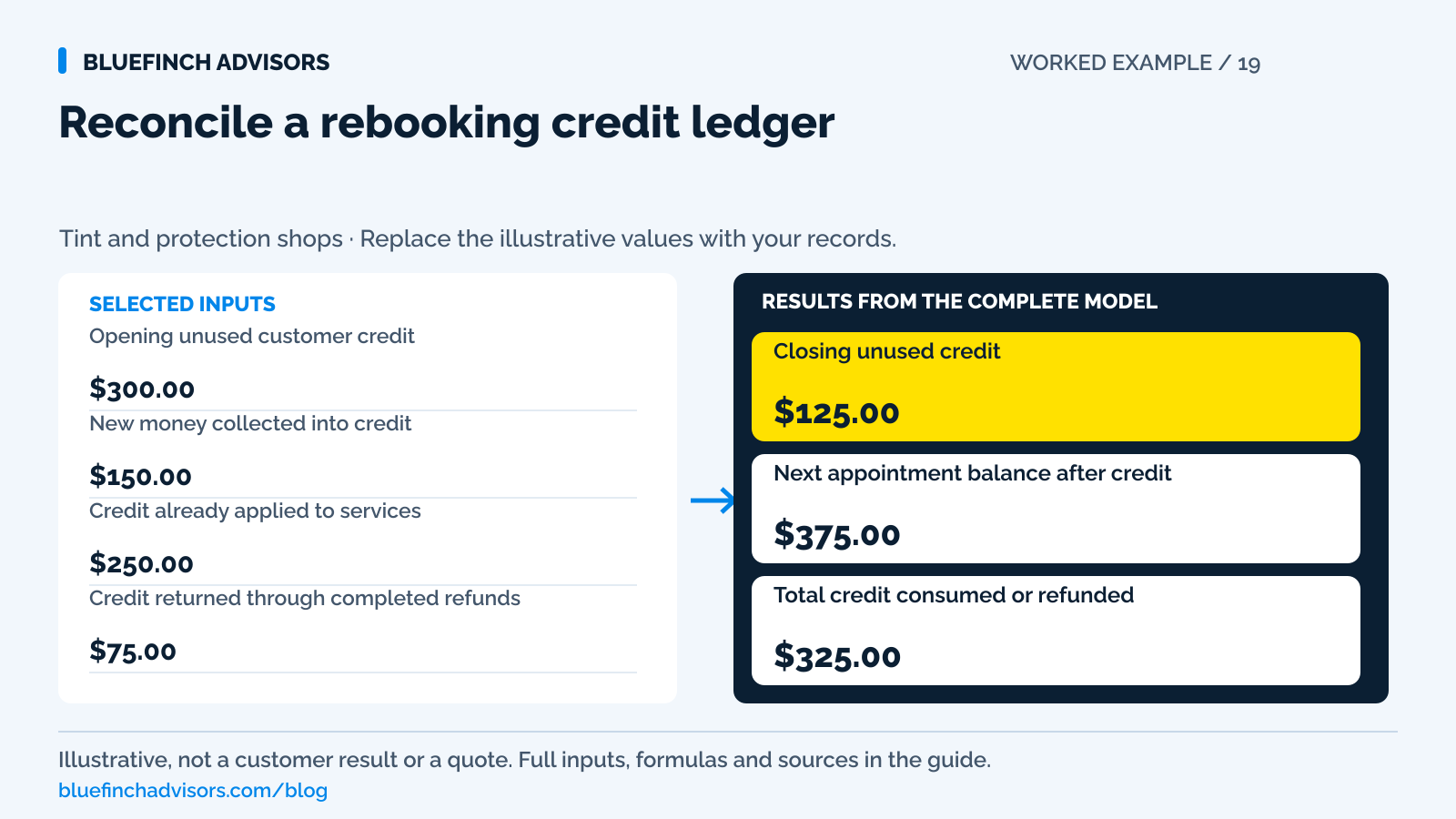
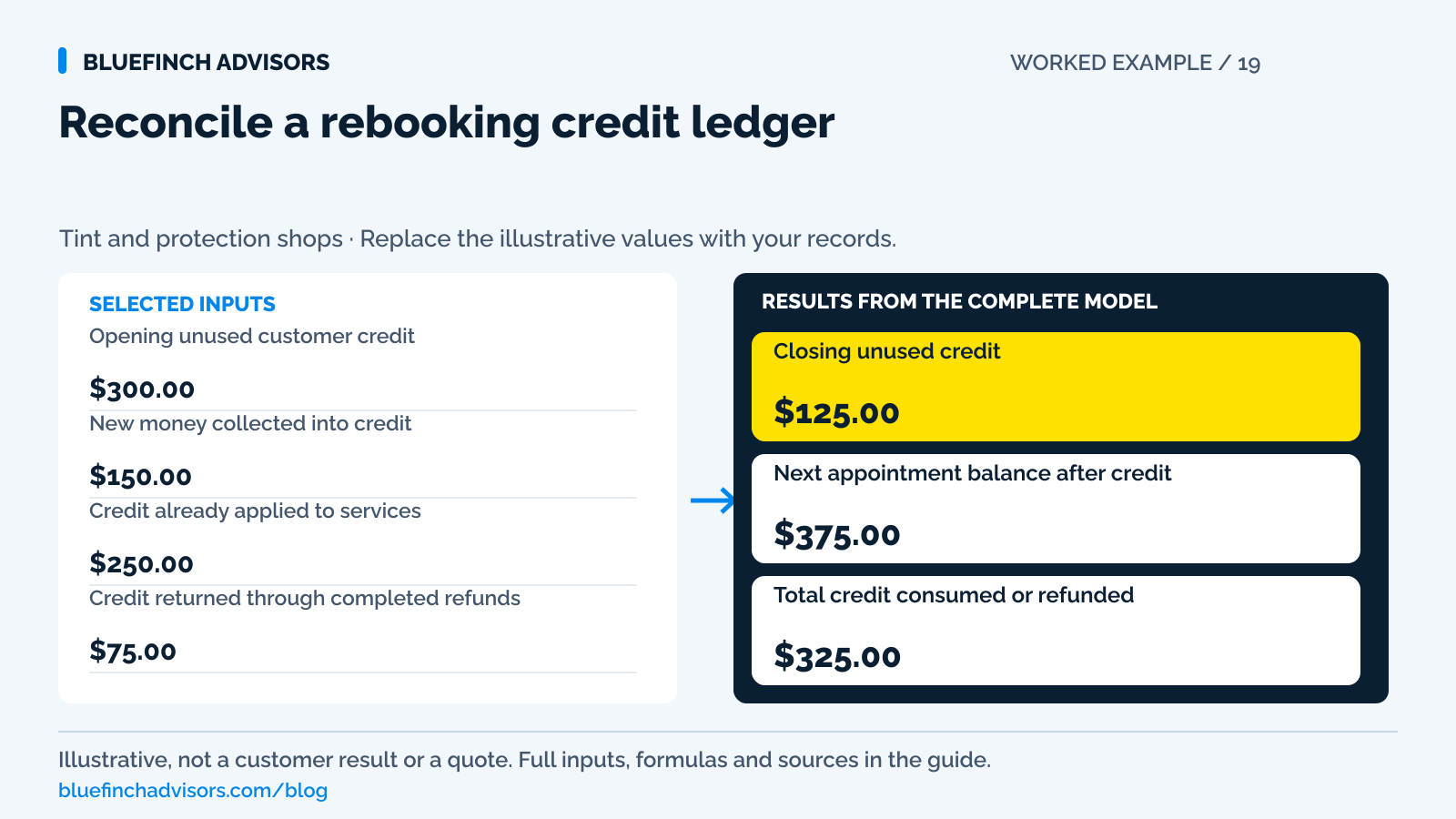
Opening unused customer credit Valid credit at the start of the reconciliation window. | $300.00 |
New money collected into credit New completed receipts only; exclude transfers between appointments. | $150.00 |
Credit already applied to services Amounts consumed by completed or invoiced services under your ledger process. | $250.00 |
Credit returned through completed refunds Exclude refunds still pending; track them separately. | $75.00 |
Next approved appointment price One selected and disclosed payment-price basis. | $500.00 |
Example results
| Measure | Result |
|---|---|
Closing unused credit Opening credit plus new receipts less applications and completed refunds. | $125.00 |
Next appointment balance after credit Assumes all closing credit is valid for this appointment; negative shows excess credit. | $375.00 |
Total credit consumed or refunded Different outflow types shown together only as a control total. | $325.00 |
Calculation detail
| Measure | Result |
|---|---|
| New receipts, not transfers | $150.00 |
| Service applications | $250.00 |
Model assumptions
- Starting values are examples, not market benchmarks or payment quotes.
- Use one currency and a consistent before-tax basis. Work out taxes and program-specific adjustments separately.
Read alongside these results
- Negative closing credit indicates an over-application or missing receipt to investigate.
- This does not determine forfeiture, expiry, transferability, gift-card law, or revenue recognition. Pending refunds require a separate hold on further use.
Download this worked example (CSV). Use the interactive version to export your own inputs and results.
Download infographic (PNG) · Download vector (SVG) · Link to the source and methodology

The short version
- A booking transfer changes a reference, not cash received.
- Record refunds separately from credit applied to completed work.
- Show both unused credit and the next appointment's remaining balance.
A customer pays a tint deposit, changes vehicles, and moves the appointment twice. The booking system creates a new job each time. At the counter, one screen shows a credit, another shows a deposit request, and the customer has the original receipt. The policy may be perfectly clear while the money record is not.
Preserve the payment record when an appointment moves; choose the no-show policy separately. The calculator starts with unused credit, adds new receipts and subtracts applications and refunds. It compares what remains with one upcoming appointment. A transfer between booking references adds no new money, preventing the same deposit from being counted twice.
Use with this guide
Set the booking policy first
Keep transfer and cancellation decisions grounded in disclosed terms.
Reconcile package balances
Separate service delivery from customer credit application.
Test deposit transfers in software
Check whether rebooking preserves one traceable financial record.
Square alternatives for tint shops: bookings and deposits
Compare tint booking deposits and pickup payment costs on the same jobs. Use the channel model and check rebooking credits, refund access and software.
Weather delays and tint deposits: record the agreement
Record tint appointments delayed by weather separately from customer cancellations. Use the deposit handoff sheet before transferring credit or collecting again.
Tint group bookings: assign each deposit to a vehicle
Allocate tint group-booking deposits by vehicle and payer. Use the ledger before moving credit, refunding an organizer or collecting individual balances.
Browse the complete window tint guides and worksheets.
Track the customer credit across booking numbers
Give the original receipt a stable reference and preserve the links to every booking that used or inherited it. Record the customer, vehicle where relevant, amount, payment method reference, applicable terms, and current available credit. A booking can be canceled while its credit remains valid under the agreed policy. Deleting the canceled job should not delete the evidence of money received or the customer's right to have it applied.
Tint Wiz's deposit guide describes tracking payments in each project's history and collecting a deposit after proposal approval. That confirms a useful platform workflow, but it does not establish how every transfer between projects behaves. Test the actual rebooking path in the shop's system. If the software automatically copies a deposit field, determine whether it copied a reference or created a second financial entry. Those two screens may look similar while producing different balances.
Sources for this section: Tint Wiz: proposal deposits and project payment history
Use distinct events for receipts, applications, refunds, and transfers
A receipt increases the customer's available money. Applying credit reduces the amount due on an invoice and consumes that credit. A completed refund returns money and reduces the remaining credit. A transfer moves the reference to another appointment without changing the total. Keep each event's date, amount, source reference, and reason. Corrections should leave an audit trail rather than erasing the entry that created the error.
Stripe's customer-credit documentation describes a transaction ledger and reversing entries rather than deleting balance history. It also distinguishes invoice credit from cash balance and notes that its credit can apply automatically to the next finalized invoice. That behavior matters if a customer has several vehicles or appointments. Do not assume a credit stays reserved for the job staff intended; verify the software's actual allocation and permissions before finalizing another invoice.
Sources for this section: Stripe: customer credit balance transaction ledger
The sample leaves $125 of credit and $375 to collect
The illustrative account opens with $300 of valid unused credit. Another $150 is newly collected. Staff have applied $250 to services and completed $75 of refunds. Closing credit is $300 plus $150 minus $250 minus $75, or $125. The next approved appointment costs $500, so applying that entire valid $125 leaves $375 to collect. The service applications and refunds total $325, but they remain different events in the ledger.
Rebooking that next appointment twice should leave both numbers unchanged unless scope, price, or the agreed policy changes. If the system instead shows $275 of credit, look for a copied $150 receipt. If it shows negative credit, check for a double application, missing receipt, or refund that was deducted twice. The worksheet keeps a negative result visible because treating it as zero would hide an accounting problem and potentially overcharge the customer at pickup.
Use the agreed policy for any rebooking charge
A credit transfer can be allowed, denied, or conditioned by the actual booking terms and applicable requirements. The ledger does not decide that policy. Before deducting any cancellation or rebooking charge, confirm that the charge is supported and disclose its effect on the customer's remaining credit. Do not call a missing software balance a forfeiture after the fact. If the policy is ambiguous, resolve the customer agreement before consuming the credit.
The calculator deliberately has no expiry or automatic forfeiture input. It tracks receipts, applications, and completed refunds that can be reconciled. Any valid adjustment needs its own documented entry and professional review where relevant. If a shop lets one household move credit between vehicles, keep the original payer and consent visible. A customer's permission to reschedule a vehicle is not necessarily permission to transfer value to a different person.
Do not turn the old deposit into a new payment-method fee
Show the existing credit as money already paid when presenting the next appointment. Under dual pricing, the new work still needs the applicable regular card and lower cash prices before the remaining payment is authorized. Ask the provider how mixed payment methods and previously collected deposits are handled. Do not subtract the same percentage from the customer's credit every time a booking moves; no new card transaction occurred merely because the appointment date changed.
Surcharging follows a separate set of restrictions, including Mastercard's exclusion of debit and prepaid. A refund also follows the provider's original-payment process. Stripe documents that original processing fees are not returned under its pricing and that refunds can remain pending. Those costs and states require accounting, but they do not by themselves give the shop a right to reduce an otherwise valid customer credit. Keep the customer obligation distinct from the merchant's payment expense.
Sources for this section: Mastercard: merchant surcharge rules and debit exclusions · Stripe: refund destinations, partial refunds, and refund status
Reconcile the credit before confirming the next balance
Before the customer arrives, reconcile the current credit to the original receipt and intervening events. Mark any pending refund so another employee does not apply the same amount to service while the refund is in flight. A pending refund should have a reference, status, and follow-up owner. If it fails, confirm the provider's returned funds and reverse the reservation correctly before making the credit available again.
Send a short confirmation stating the new appointment, current approved price, valid credit being applied, and remaining amount. At completion, link the final receipt to the ledger application. Once a week, review canceled appointments with nonzero credit and customers with negative balances. The useful next action is to take one multiply rebooked customer and reproduce every dollar without asking staff to rely on memory. If that cannot be done, fix the ledger before taking another deposit.
Questions business owners ask
Is moving a deposit to a new appointment a new receipt?
No. It moves an existing balance or reference. Record new money only when another payment is actually collected.
Should a pending refund reduce available credit?
Reserve the amount against further use while tracking the refund separately. This calculator deducts completed refunds; it does not manage an in-flight refund hold.
Can the next appointment use only part of the credit?
Yes, if the policy and system support it. This comparison assumes full application, so record the actual partial application in the ledger and preserve the remaining customer credit.
Primary sources
BlueFinch last reviewed these sources on October 2, 2026. Payment rules and state requirements can change.
- Tint Wiz: proposal deposits and project payment history
- Stripe: customer credit balance transaction ledger
- Mastercard: merchant surcharge rules and debit exclusions
- Stripe: refund destinations, partial refunds, and refund status
Use this page for general business information. It is not legal, tax, or accounting advice.